

Vendors and imports
Adding a vendor, feed types, the download schedule, and what the states next to the last import mean.
On this page
A vendor is a source of products. Everything else in Monokaido — categories, parameters, prices, images — originates in some feed, which is why catalogue problems are almost always solved here.
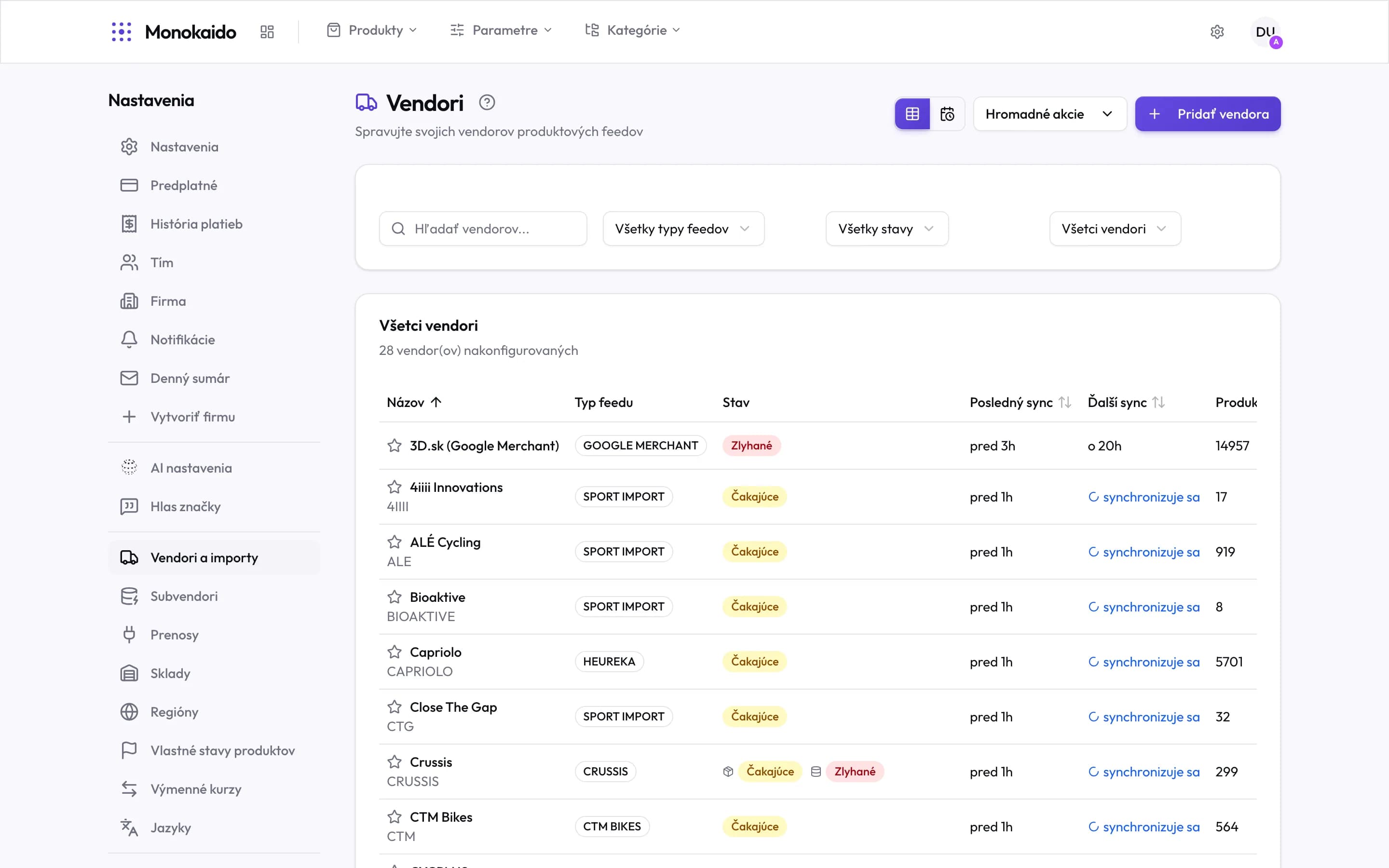
Controls on this screen
- Vendors & imports — The left menu is the whole Settings section; this screen is its most-visited entry.
- Add Vendor — Opens the choice of how a new feed is connected.
- Bulk actions — Runs a sync, or a settings change, across several vendors at once.
- View switch — Table versus a calendar of scheduled synchronisations.
- Feed type — Narrows to one format — Heureka or Google Merchant, for instance.
- State — Failed, pending, running, healthy.
- Star — Marks a vendor as primary. In automatic duplicate detection its product is the one that survives.
- Feed type — The format this vendor sends data in.
- Last run state — "Failed" is the only state that needs a person.
- Last sync — When the feed last completed.
- Next sync — When the next run is due, or that one is running now.
- Products — How many products this vendor contributes to the catalogue.
Adding a vendor
Add Vendor offers five routes. They differ in one thing: who decides which feed field means which product field.
| Route | When to use it | Note |
|---|---|---|
| Known format | The feed is in a format we already know — Heureka, Google Merchant, Sport Import and the like. | The fastest. The mapping is done; all it needs is the feed address. |
| AI analysis (auto) | An unfamiliar XML, JSON or CSV feed. | The AI reads the feed and proposes a mapping, which you then confirm or adjust. The mapping is recorded as ai_generated. |
| Manual mapping | An unfamiliar format you would rather map yourself. | Full control. Right when a feed has an unusual structure the AI keeps reading wrong. |
| ETIM | The vendor supplies its catalogue in the ETIM standard, as a BMEcat XML. | Mostly electrical, HVAC and technical trades. From an address or as an uploaded file — see ETIM. |
| File upload | A one-off or manually refreshed CSV or XLSX file. | Nothing is downloaded from an address — you upload the file. A BMEcat XML belongs under ETIM. |
ETIM
An ETIM vendor sends its catalogue as BMEcat, an XML standard carrying the ETIM classification, used mostly by electrical, HVAC and MRO brands. BMEcat has a fixed structure, so nothing is mapped here: no column preview and no feed mapping. The system reads the file on its own.
Creating an ETIM vendor
Click Add Vendor and choose ETIM (BMEcat). The screen first asks where the data comes from:
| Mode | When to use it | What happens once it is created |
|---|---|---|
| URL feed | The vendor publishes the BMEcat at an address — HTTPS, HTTP, SFTP or FTP, with a username and password if needed. | The catalogue is downloaded automatically on its schedule, like any other vendor. |
| Upload file | You have the BMEcat file from the vendor at hand. | The file is uploaded and the first sync starts straight away. You upload a newer catalogue yourself later — see below. |
The Common settings apply to both modes: name, optional code, feed currency, the region for VAT, and a default margin — the purchase price is derived from it when the catalogue does not state one.
For an uploaded file:
| Rule | What it means |
|---|---|
| Format | BMEcat XML as .xml, or compressed as .xml.gz (gzip) or .zip. A file with any other extension — a CSV or an XLSX, say — is refused at once, before it is uploaded. |
| Size | At most 200 MB. The limit applies to the file you upload — for an archive, to its compressed size. Unpacked, the catalogue may be at most 2 GB; a larger one fails at sync, in URL-feed mode too. |
| ZIP archive | Only one file of the archive is read: the first whose name ends in .xml, in the order the archive stores its files (files in sub-folders count too). Everything else in the archive is ignored, and an archive with no .xml file fails at sync. So put a single BMEcat catalogue in it. |
| Time | An upload has 9 minutes to finish. The screen shows its progress meanwhile — keep it open until it is done. |
A new BMEcat file
Has the vendor sent you a newer catalogue? In the vendor list (Opens in a new tab), open the menu on its row and choose Upload new file. That item is only there for vendors created by uploading a file — a URL-feed vendor downloads its catalogue by itself.
Check what is uploaded now
The screen shows the name and time of the last uploaded file.
Drop the new file
The formats and limits are the same as at creation, so a
.xml.gzor.zipworks here too. There is no column mapping here — BMEcat does not need one.Click Upload and sync
The new file replaces the previous one and a sync starts straight away. Follow it in the Import logs (Opens in a new tab).
States, and what to do about them
| State | What it means | What to do |
|---|---|---|
| Healthy | The last run completed without error. | Nothing. |
| Pending | A run is scheduled and waiting in the queue. | Nothing. With many vendors at once the queue works through them in turn. |
| Synchronising | An import is running now. | Watch it in the Import logs (Opens in a new tab). |
| Failed | The run ended in an error. | Open the last run's log — it carries the specific reason (unreachable address, changed structure, invalid XML). |
The primary vendor
The star beside a name marks the primary vendor. It has one consequence, but an important one: in automatic duplicate detection the system prefers the primary vendor's product as the one that survives a merge. If neither side is primary, the older record wins.
The download schedule
Every vendor has its own schedule. The switch in the top right turns the list into a calendar showing how the runs are spread over time — useful when imports slow each other down because they are all scheduled for the same hour.
I added a vendor but no products appeared.
Check the last run's state. If it says Failed, the reason is in the log. If it says Healthy and there are still no products, the feed mapping probably left the required fields unassigned — open the vendor detail (Opens in a new tab) and check the mapping.
Why is the same product in my catalogue twice?
Two vendors are sending the same goods. That is what Merging duplicates is for.
I uploaded a new BMEcat file, but the screen said the sync could not be queued.
The file has already been replaced; only the import did not start. In a moment, choose Sync Now on the vendor.
My ETIM vendor uses a URL. Where do I upload a new catalogue?
Nowhere — such a vendor downloads its catalogue from the address by itself, on its schedule. You upload a new file only for a vendor that was created by uploading one.
Can I switch a vendor off temporarily?
Yes, in the vendor detail. A disabled vendor stops being downloaded, but its products stay in the catalogue.