

Editing and creating a product
Editing a product by hand, creating one without a feed, and the rule that decides whether an import overwrites your change.
Most products arrive in a feed and maintain themselves. Editing by hand is for the cases where a vendor sent something wrong or did not send it at all — and for products that have no feed behind them.
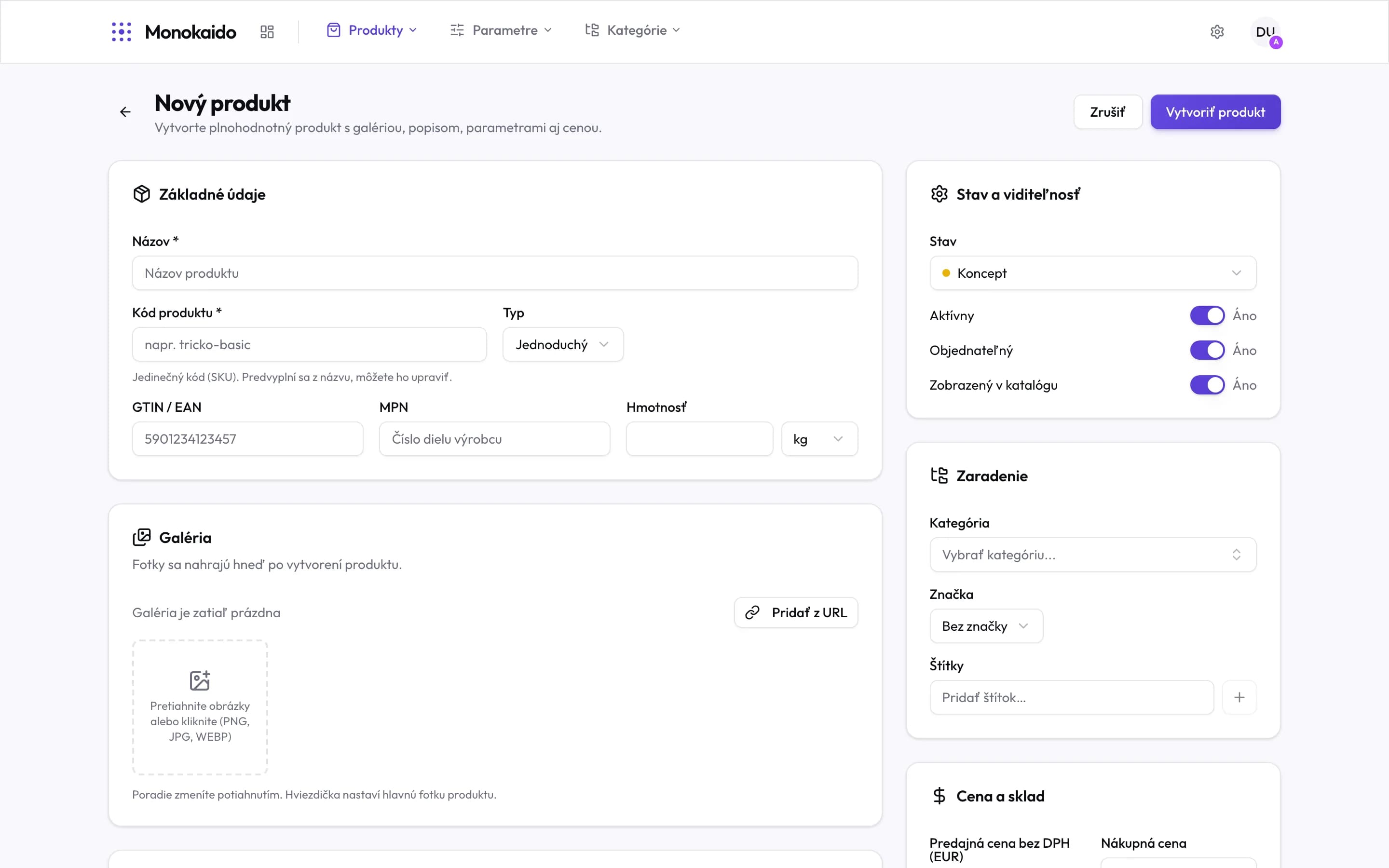
Controls on this screen
- Create product — Saves the product, then uploads the photos from the gallery.
- Name — Required. The code is pre-filled from it.
- Product code — Required and unique. This is the identifier the product is matched by — change it only deliberately.
- Type — Set automatically from the number of variants; only Bundle / Digital are chosen by hand (informational).
- GTIN / EAN — The barcode. It is also the most reliable way duplicates are found.
- Weight — It does not affect the shipping price. Checkout charges the price set on the shipping method.
- Gallery — Add photos before saving; they upload as soon as the product is created. The star sets the lead image — it always comes first; drag the others into order.
- Status — Draft until the product is finished.
- Active — Whether the product exists at all.
- Visible in the catalogue — Whether the shop shows it. The three toggles are independent — a product can be active and hidden.
- Category — Your category. Without it nobody finds the product in the shop.
- Brand — The manufacturer.
- Price and stock — Selling price, purchase price and availability.
The rule that decides everything
This is the most important sentence in the chapter:
What that looks like in practice:
| Situation | What to do | Why |
|---|---|---|
| A vendor sends a wrong name on one product. | Edit it in the editor. | It is marked manual and imports stop touching it. |
| A vendor sends wrong names on every product. | Use a rule or a bulk action. | Correcting a thousand products by hand is a week of work. |
| You want a product the vendor does not carry. | Create it by hand. | It has no vendor, so no import will ever change it. |
Can I add photos before the product is saved?
Yes. On a new product you add them to the gallery straight away, and Monokaido uploads them once you click “Create product” and the product exists. When you edit an existing product, a photo uploads immediately.
In what order are the photos shown, and does the import change it?
The main image always comes first, followed by the others in the order you set by dragging — in the gallery when editing the product, or in the "Images & Assets" block on its detail. The shop shows them in this order and a generated description places them in this order; it never uses the same photo twice, even when the supplier sent it twice under another address. Once you change the order, the feed import keeps it and no longer changes your main image: photos the supplier adds later are appended at the end.
Can I swap an image in the description for another photo of the product?
Yes, in the manual description. Click "Edit image" on the image (or double-click it) and pick another photo from the product's gallery. The photos are in the order the shop shows them, and those already in the description are marked "In the description" — "In the description 2×" when a photo is there more than once. The photo you are editing is marked "This image". You can also enter the address of another image, change the alt text or remove the image from the description. Insert a new image with the image button in the editor's toolbar. The window offers the gallery when you edit a saved product; while creating one, enter the image's address — you can pick the product's photos once it is saved. The layout of a generated description — its columns, styles and specs table — stays as it was; the table cannot be edited in the editor.
I changed the price and after the import it is the old one.
The feed sends the price, and every import overwrites it with the feed's value. A price changed by hand is not protected from the import. The exception is a WooCommerce vendor: in its settings you can switch off “Prices” under “Import scope (WooCommerce)”. Prices in the other regions are also recalculated from the default region, both on import and by the “Propagate Prices” flow step.
Can a simple product become one with variants?
Yes, and there is nothing to switch: add a second variant and the type becomes Configurable on its own. When the variants drop back to one, it returns to Simple.
What is a configurable product? What can I configure on it? Where do I set the options?
A configurable product is a product with several variants — sizes or colours, say, that the customer picks from in the shop. Nothing else is set on it: the options are the variants themselves. You add them in the product editor on the Variants tab (each has its own SKU, price and stock); products from a feed get their variants straight from the feed. The type follows the number of variants automatically.
What are Bundle and Digital?
Labels you set by hand so you can filter such products — in the product list, in bulk actions and in flows. They change nothing about how the shop or the exports behave.