

The product list
Filters, search, columns, selecting several products, and the bulk actions that run over a selection.
On this page
The product list is the catalogue's workbench. Most work in Monokaido starts here: you filter down to a set of products, check it, and do something with it — one at a time or in bulk.
The screen has two halves, and it helps to think of them separately: the top defines the set, the bottom works on it.
Defining the set
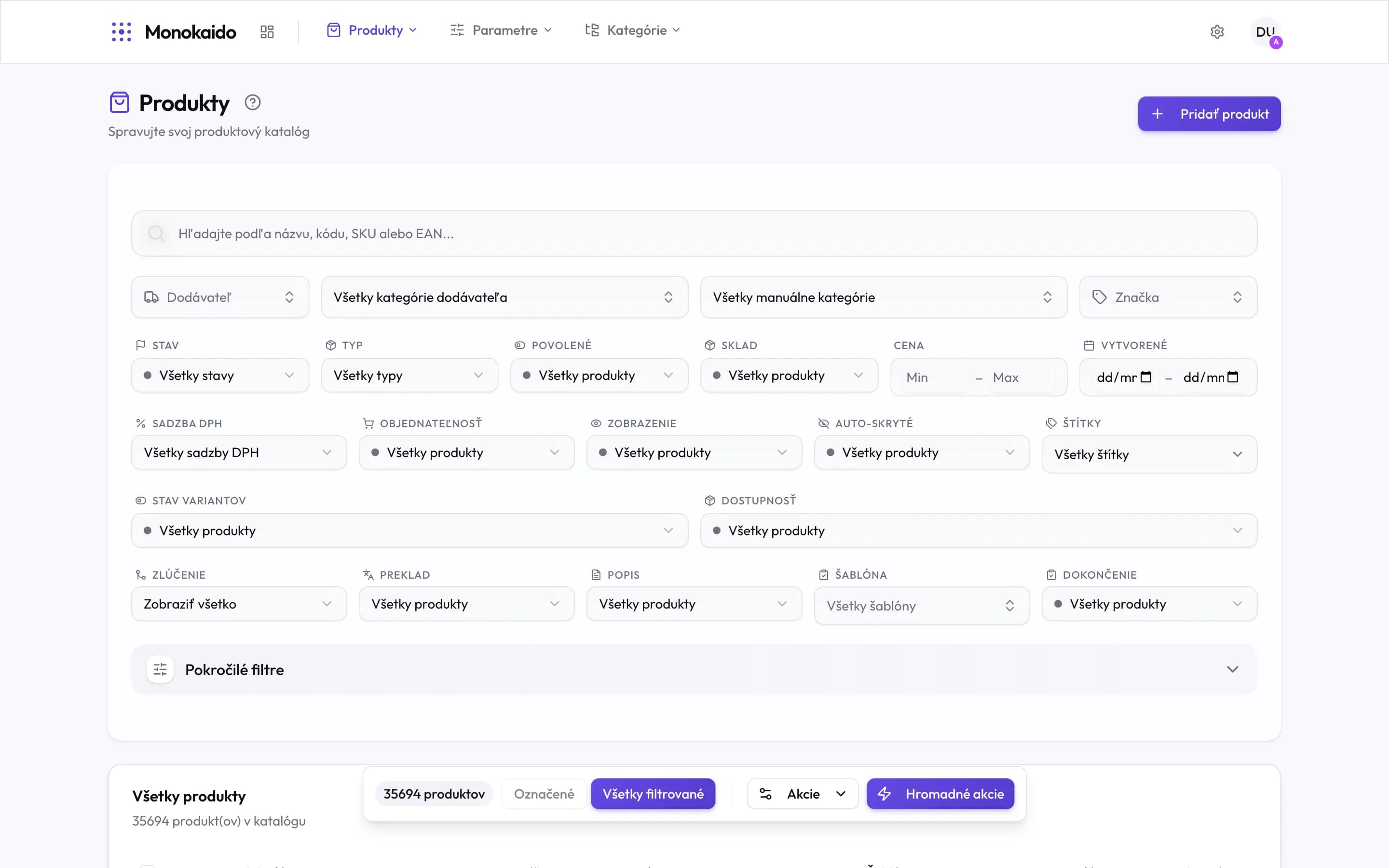
Controls on this screen
- Add product — Creates a product by hand, with no feed behind it.
- Search — Matches name, code, SKU or EAN. It debounces as you type, so there is nothing to confirm.
- Vendor — Narrows to one feed. Usually the first step when chasing an import problem.
- Vendor's categories — Categories as the feed sent them — not your tree.
- Manual categories — Your own category tree.
- Brand — The unified manufacturer brand.
- Status — Draft, published, archived, and your own statuses.
- Advanced filters — Opens further conditions — by missing parameters or translations, for instance.
Filters combine: each one narrows what the previous ones left. The selection is written into the page address, so a filtered view can be sent to a colleague as a link, or bookmarked.
| Field | What it does | Note |
|---|---|---|
| Status | Draft, published, archived, and custom statuses. | You define custom statuses under Product statuses (Opens in a new tab). |
| Type | A simple product versus one with variants. | A product with variants carries its own price and stock on each variant. |
| Enabled · Visibility | Whether the product is enabled, and whether it appears in the shop. | Two different things: a product can be enabled and still hidden by a rule. |
| Stock · Price | Availability and a price range. | An empty "Min" or "Max" means no bound on that side. |
| Auto-hidden | Products hidden by a rule rather than by a person. | Useful for the question "why is this not in the shop". |
| Merge | Primary, secondary or uninvolved products. | Secondary products are the ones hidden by a duplicate merge. |
| Translation · Description · Template | Whether a product has a translation, a description and a parameter template. | This is the fastest way to find work that is still outstanding. |
Searching by a list of codes
When you have a list of products from Excel, an e-mail or an order, do not look them up one by one. Switch the search box with List (on the right of the search box) and paste the codes, EANs, SKUs or IDs — separated by commas, semicolons, spaces or new lines (a column copied from Excel works as is). Paste a list straight into the ordinary search and it switches by itself; Search as one text switches it back.
A list looks for an exact match: a product is found when its code, EAN, external ID, ID, or a variant's SKU or EAN equals one of the values (letter case does not matter). Duplicates are skipped, and a list holds at most 300 values. Under the box you see how many values have no product in the result — they are highlighted and can be copied or removed from the list. The list combines with the other filters and also applies to All filtered in bulk actions.
Working on the set
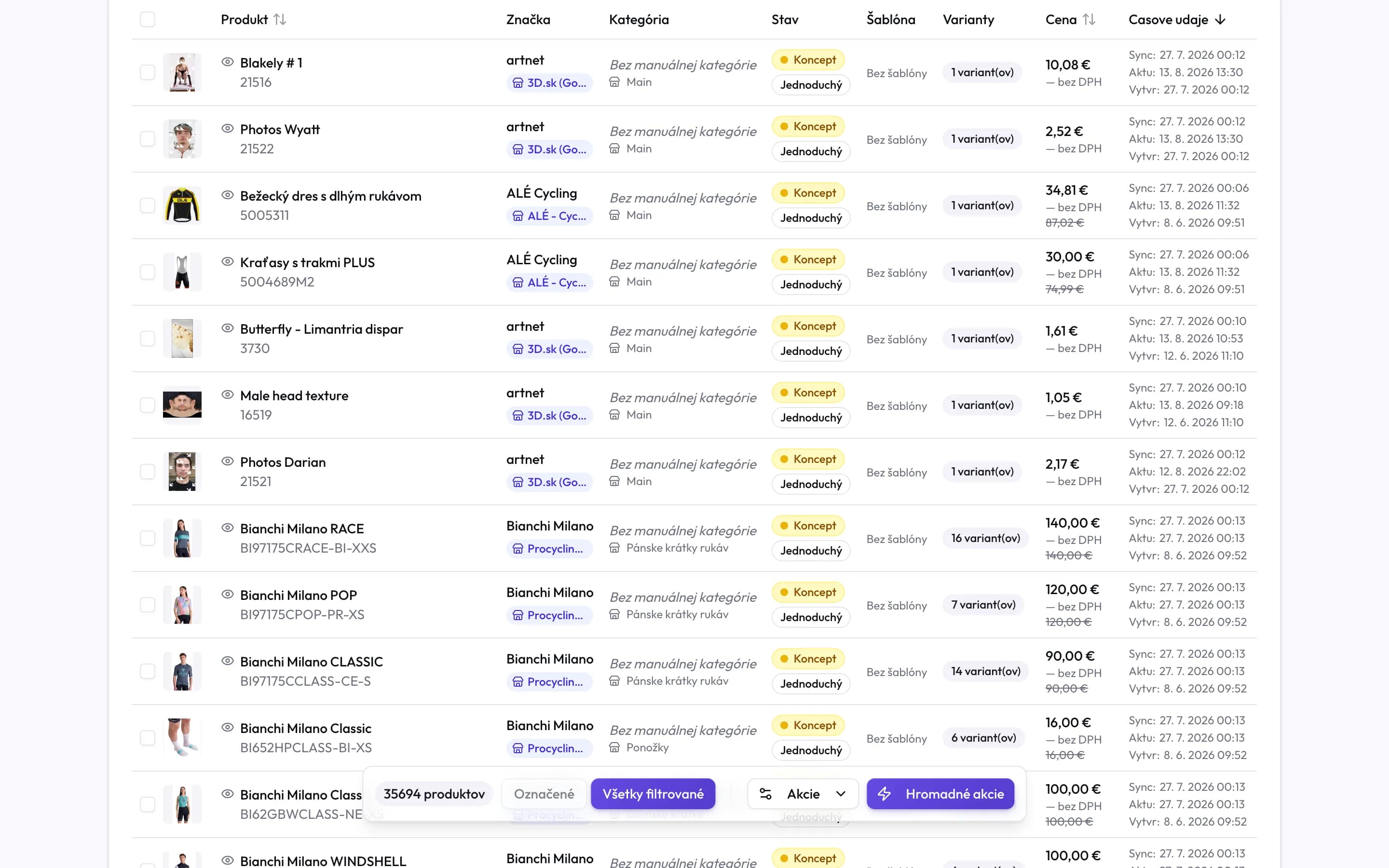
Controls on this screen
- Select all on page — Selects the rows on this page. The selection survives paging.
- Sorting — The arrows in a column header change the order. Name, price and time can be sorted.
- Preview — The eye icon opens a quick preview without leaving the list.
- Brand and vendor — The unified brand on top, below it the vendor whose feed the product came from.
- Category — Your manual category on top, the feed category below.
- Status — Draft, published or archived.
- Type — A simple product, or one with variants.
- Variants — The variant count. Zero means a simple product.
- Price — The current price; a struck-through figure is the price before a discount.
- Timestamps — When the product last arrived from the feed (Sync), when it last changed (Updated) and when it was created.
- Count and selection — How many products the filter found, and how many of them you have selected.
- All filtered — Extends the action to the entire filter result, not just the ticked rows.
- Bulk actions — Opens the action dialog for the selection — including AI descriptions and translations.
Timestamps: three different times
The right-hand column carries three dates, and they are the most commonly confused thing here:
| Field | What it does | Note |
|---|---|---|
| Sync | When the product last arrived from the vendor's feed. | Even if nothing changed. An old date means the import is not running. |
| Updated | When any value on the product last changed. | The change can come from the feed, a rule, the AI or a person. |
| Created | When the product first appeared in the catalogue. | It never changes. |
I filtered a set of products and want to send that view to a colleague.
Copy the page address. The filters are written into it, so your colleague opens exactly the same result.
Why does a product say “No manual category”?
It has a category from the feed, but that category is not mapped to your tree. Resolve it in Category mappings (Opens in a new tab).
I selected products and moved to the next page — do I lose the selection?
No. The selection survives paging and re-sorting. It is cleared by changing a filter, or by the clear-selection button.
What is the difference between “Enabled” and “Visibility”?
Enabled is your decision that the product may be sold. Visibility says whether it actually appears — a product can be enabled and still hidden by a rule, or by being the secondary side of a merge.