

Languages and translation
The catalogue's languages, the source language, and the automatic translation rules.
On this page
A language in Monokaido is not just a translation — it is a market. Every target language carries its own currency and its own pricing, so adding one opens another market rather than merely another language version.
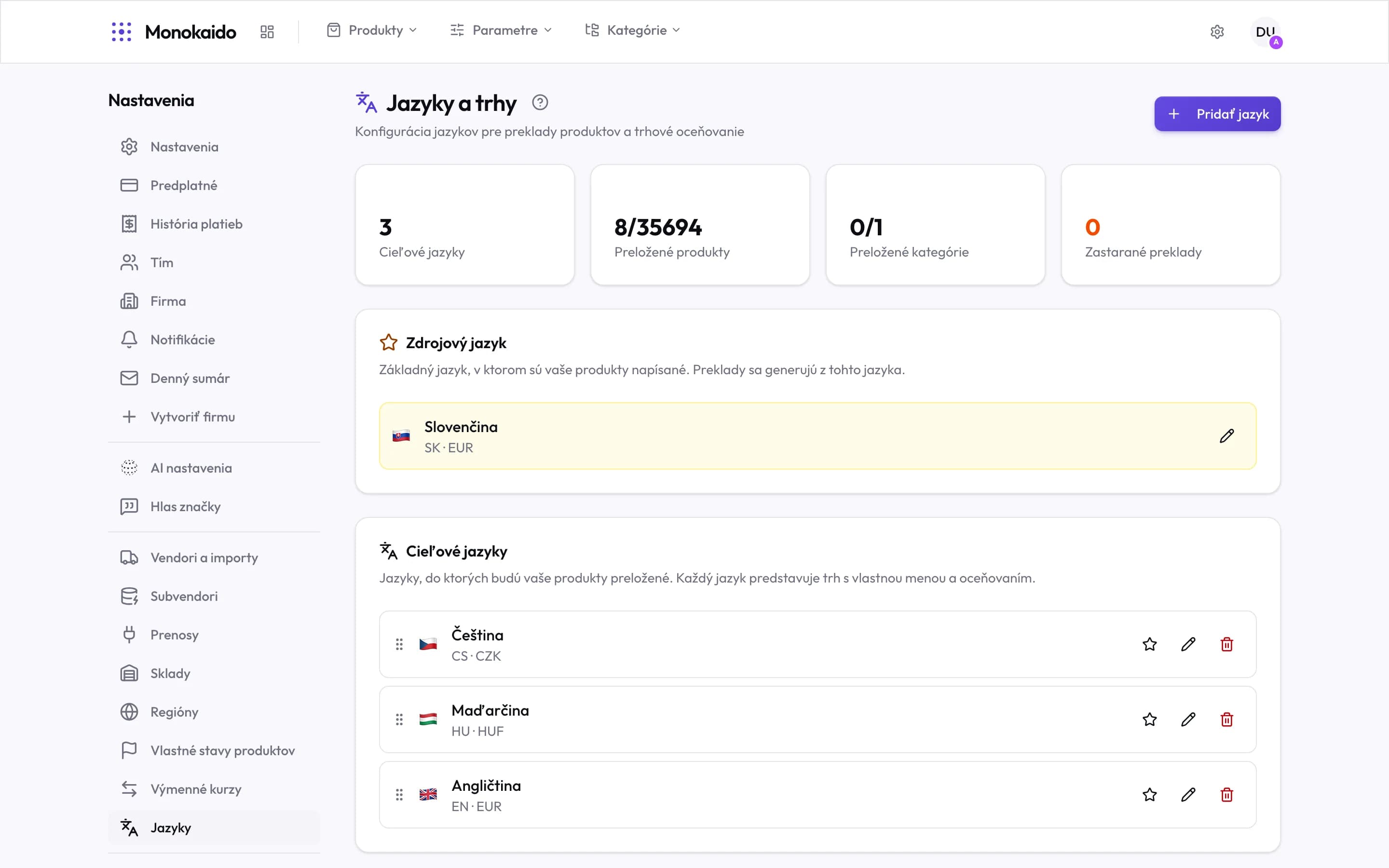
Controls on this screen
- Add language — A new target language, with its currency.
- Target languages — How many languages besides the source you have.
- Translated products — Translated against total. This is the real state of the work.
- Translated categories — The same for categories.
- Stale translations — Translations whose original has changed since. A non-zero figure means the shop is showing old text.
- Source language — The language the products are written in. Everything else is translated from it.
- Target languages — Each is a market of its own, with its own currency.
- Order — Dragging changes the order languages are offered in.
- Star — Marks a language as the source.
Source and target languages
| Role | What it means | Note |
|---|---|---|
| Source | The language data arrives in, and the originals are written in. | Exactly one. Everything else is translated from it. |
| Target | A language translated into. | It carries its own currency — a market, not just a language. |
Translation glossary
When translating, the AI “localises” some terms — it turns “SK distribúcia” into “HU distribúció” in Hungarian, or “SK klávesnica” into “HU billentyűzet”. The product does not change with the shop's language, so the customer then gets something other than what the title promises. The translation glossary is a list of terms where the AI must do exactly what you say.
The Translation glossary card appears once you have at least one active target language. Admins and editors can change it. A glossary holds at most 500 terms, and all its terms, fixed translations and notes together at most 40,000 characters.
| Field | What it means | Note |
|---|---|---|
| Term | The phrase as it appears in the source-language text, e.g. “SK distribúcia”. | The AI also finds it in other grammatical forms and in any letter case. |
| Do not translate / Translate | What happens in a language that has no fixed translation. | “Do not translate” keeps the term exactly as written. |
| Fixed translation per language | The text the AI writes in that language instead of the term, e.g. “EU disztribúció” in Hungarian. | Optional; applies only to the language filled in. |
| Note or condition | Context for the AI, e.g. “Only when it names the keyboard layout.” | The AI applies the term only where the note allows it. |
The glossary applies to AI translations of products, parameters and their values, categories, blog articles, the home page and storefront content. It does not apply to the storefront's interface texts (buttons, the cart).
Where are translations run from?
Products through bulk actions in the product list; parameters in Parameter translations.
I added a language and nothing was translated.
When you add a target language, Monokaido translates your manual categories in the background. It needs AI to do so: Monokaido AI or a provider of your own. Products are not translated on their own. Select them in the product list and run the bulk AI action “Translate”.
The AI changes the country marker in a translation (SK → HU).
Add the term to the Translation glossary on this page — set to “Do not translate” or with a fixed translation for that language — and translate the affected content again with forced re-translation: the products in the product list, the parameter values in Parameter translations.