

Changes to review
The queue of changes an import brought in — what changed, how to compare it, and what approving means.
On this page
The catalogue changes without you touching it — imports bring new prices and stock, rules overwrite fields, the AI fills in descriptions. This screen is the one place to see what exactly changed and where it came from, and to put it back if needed.
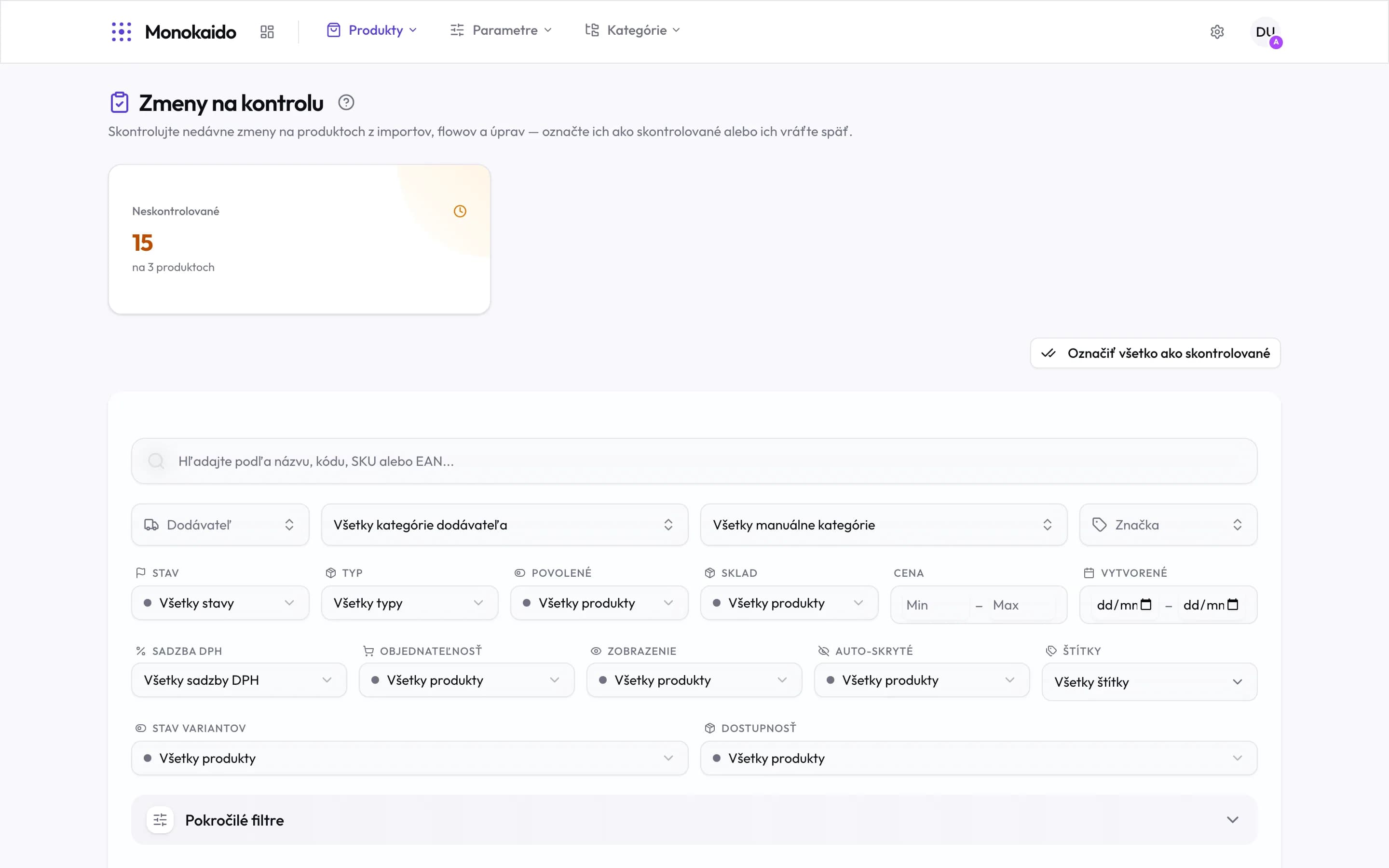
Controls on this screen
- Unreviewed — How many changes are waiting, and across how many products. The same figure appears as a badge in the main menu.
- Mark all as reviewed — Empties the queue in one click. It reverts nothing — it only records that you looked.
- Search — Narrows the queue to one product by name, code, SKU or EAN.
- Vendor — This screen's most useful filter — it shows what one particular feed did.
- Status — The same filter set as the product list.
- Advanced filters — Further conditions — price changes only, or availability changes only.
What reaches the queue
Not every change. What lands here is what you would want to see if it were wrong:
| Source | Example | Note |
|---|---|---|
| Import | The feed sent a different price, stock level or name. | The most common source. A price moving by tens of percent is exactly what is worth catching before a customer sees it. |
| Flow | A flow step overwrote a field according to a rule. | Which step it was is in the flow run detail. |
| Manual edit | A person changed the product. | Recorded together with who it was. |
| Bulk action | A bulk change of status, category or brand, one-off or from a rule. | Listed as “User · bulk-action”. Flags such as orderability are recorded as already reviewed and skip the queue. More in Bulk actions. |
| AI | A generated description, a filled-in parameter, a translation. | Filled-in parameters and translations carry the “info” tag: they can be marked reviewed, not reverted. The call itself is in the AI logs. |
Working through the queue
Filter to what matters
At hundreds of changes, filtering by vendor or by change type is the difference between ten minutes of work and an hour.
Open the change
The detail shows the old and new value side by side, with the source of the change and the time.
Decide
Either mark it reviewed (the value stands, it just leaves the queue), or revert it to what it was.
The badge in the menu has not cleared even though I reviewed everything.
The badge refreshes with a short delay. If it survives a page reload, changes remain outside your current filter — switch the filters back to All.
Why do I see a change I made myself?
So the history is complete. Your own change simply needs marking as reviewed.
Can the review be turned off?
The queue does not have to be worked through — nothing stops if you ignore it. But the badge stays, and with it the fact that the catalogue is changing unsupervised.