

Setting up the company
The first screen after registering: choosing a package, the trial, and what the choice switches on.
On this page
Straight after registering, the application puts one decision in front of you: which package. It is not only a price — the package decides how many vendors you can connect and most of the modules in the menu (the e-shop and the blog are paid add-ons).
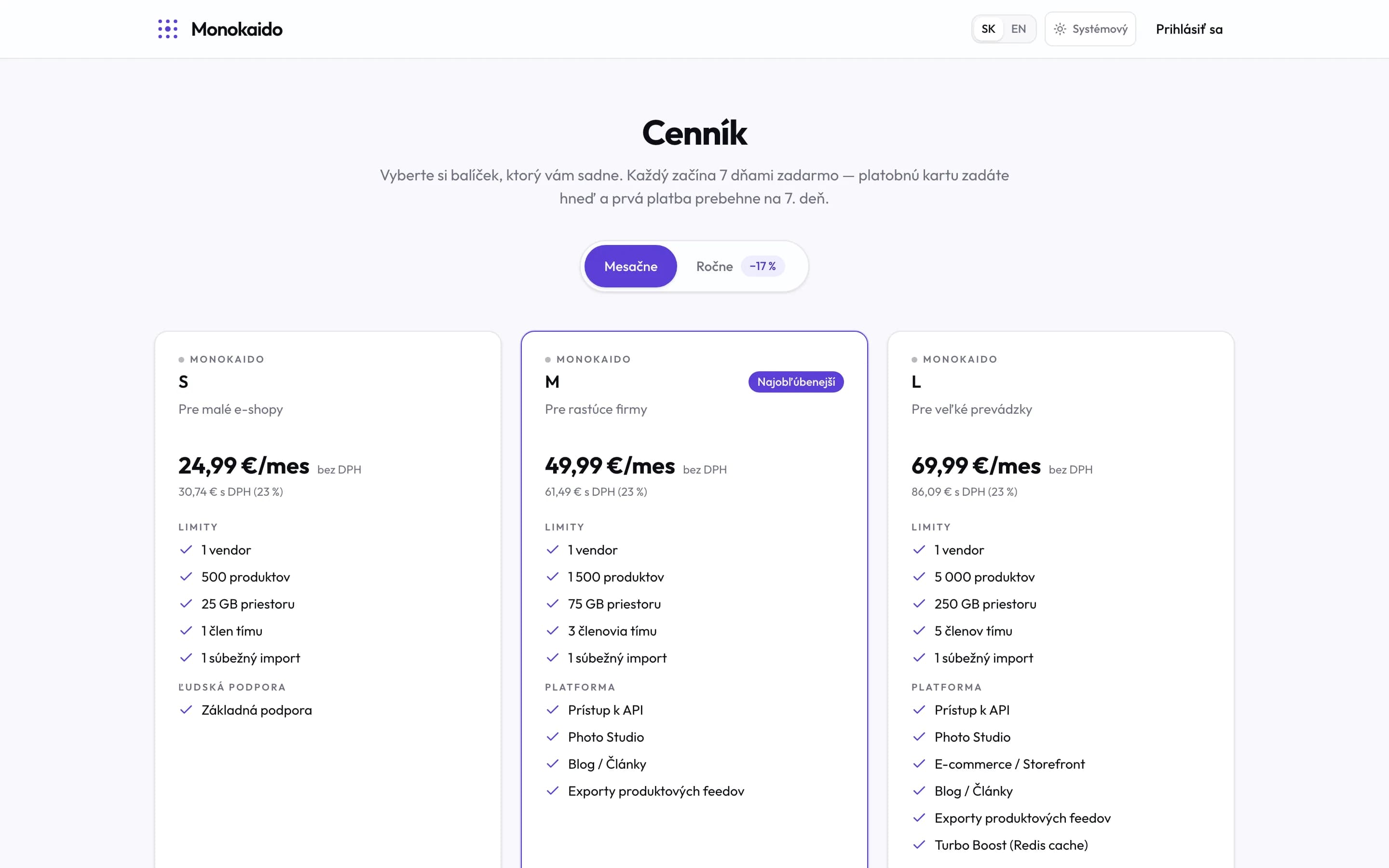
Controls on this screen
- Terms without an asterisk — Seven days free, card up front, first payment on day seven. The welcome screen repeats the same.
- Billing period — The toggle recomputes every price. The yearly saving is stated on it.
- A package — A card has three parts: the price, the limits, and what of the platform you get.
- Recommended package — The badge is a recommendation, not a technical difference. The welcome screen may recommend a different one.
- Price ex-VAT — The large figure excludes VAT; the gross amount sits below it. The invoice shows the second one.
- One vendor on S, M and L alike — This surprises people: the vendor count does not differ between S, M and L. More comes with Concierge and Prime.
- Product count — This is the real difference between S, M and L. Choose on it.
- Platform — The modules you have on. The photo studio and exports come with a package; the shop and the blog are paid add-ons to any package.
- Language — The price list is public and bilingual — a link to it can be sent to someone with no access to the application.
Choosing a package is how the trial starts
This tends to surprise people, so plainly: there is no separate "start trial" button. The trial is a property of the package you choose — so what you are choosing is not whether to try, but what you spend the week trying.
| What the screen promises | How it works |
|---|---|
| 7 days free | Nothing is charged for the first seven days. |
| Card required | You enter a card straight away, but it is there to be verified — nothing is taken today. |
| First charge on day 7 | Only after the trial ends, and the screen names the exact date. |
| Cancel any time | During the trial, in the subscription settings: “Manage billing” takes you to the payment gateway, where you cancel and pay nothing. |
How to choose
The actual offer is on the screen itself, because it is loaded from the server and changes over time. The decision rule is simpler than it looks:
Estimate how many products you will hold
That is the main difference between the ordinary packages. The vendor count does not differ between them — more than one comes only with the larger packages, so if you need to connect two sources the choice is settled at the outset.
Treat the shop and the blog separately
The e-shop and the blog are paid add-ons you can put on any package — right after choosing one, or at any time later in the Add-ons card under Subscription. If Monokaido only normalises data and hands it on elsewhere, you do not need the e-shop at all.
Switch the billing period
Paying yearly is markedly cheaper. The toggle sits above the cards and the prices recompute at once.
Apply a discount code if you have one
The code goes in here and the prices on the cards update immediately. It is applied at checkout.
What a package and the add-ons switch on
This is why the manual keeps coming back to the package: features you do not have do not appear in the menu. They are not hidden by accident and nothing is broken — Monokaido deliberately does not show settings that would do nothing in your company.
| Module | What appears in the menu | How it is switched on |
|---|---|---|
| Ecommerce | Orders, customers, shipping, payments, discounts, loyalty, shop content. | The paid E-shop add-on, on any package. |
| Blog | Articles, categories, authors, the topic pool. | The paid Blog add-on, on any package. |
| Photo studio | Product photo editing and its settings. | Package M and up. |
| Exports | Outbound feeds for comparison sites and partners. | Package M and up. |
The rest of the company details
The welcome screen deals only with the package. The company name, billing details, VAT ID, logo and default language are set in company settings, and can wait until after you have looked around.
Can anyone on the team choose the package?
No, only a company admin. Everyone else sees a note saying the choice belongs to the admin.
I came in on a coupon — the screen offers nothing.
When the package is covered by a coupon, the screen says so and there is nothing to choose or pay for. Carry on to the dashboard.
Where is the price list without signing in?
On the public Pricing page. It is the same offer without the tie to your company — and the package it recommends may differ, because it ranks the market while the welcome screen recommends a starting point.
Can the package be changed later?
Any time. The change takes effect immediately — see Subscription and limits.