

Content generator
AI-written copy for the shop's categories and landing pages.
Shop categories tend to be bare — a heading, some filters and straight into the products. The content generator fills in the text: what is in the category, how to choose, and how the types differ.
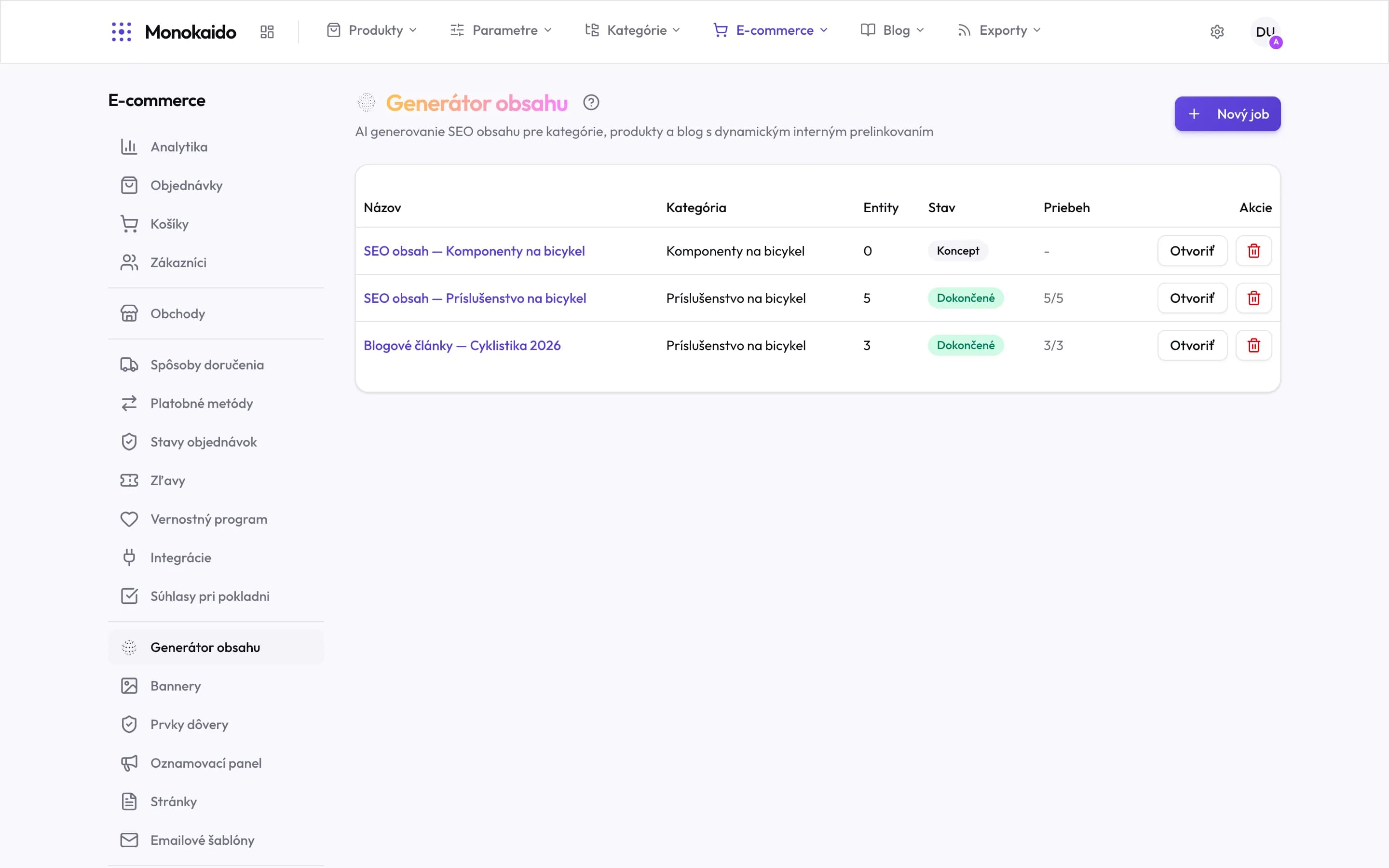
Controls on this screen
- What it generates — SEO content for categories, products and the blog, with automatic internal linking between them.
- New job — A new batch. You define the scope and the job is then processed in the background.
- Job name — Name it so that in a month you still know what is in it.
- Category — The job's scope — which part of the catalogue it draws entities from.
- Entities — How many texts the job will produce. Zero means the scope has matched nothing yet.
- Status — A draft is prepared but not started. Completed means the content exists.
- Progress — Processed out of total. A draft shows a dash — it has not run.
- Open — The job detail with the generated texts. This is where content is reviewed before publishing.
How it works
Choose the target
The category or landing page the copy is for.
Add the brief
The more specific the better. "Road bikes for beginners, emphasis on the difference between aluminium and carbon" beats "write about road bikes".
Generate
The AI uses your Brand voice and what it knows about the category from the catalogue.
Review and save
The text is a proposal, not a finished thing.