

Product detail
Everything the system knows about a product — including the raw feed data and where each value came from.
The detail is the one place you see a product whole — and, more importantly, where you see where each value came from. On a product that has been through an import, a mapping, a rule and the AI, it is the only reliable answer to "why does it say that".
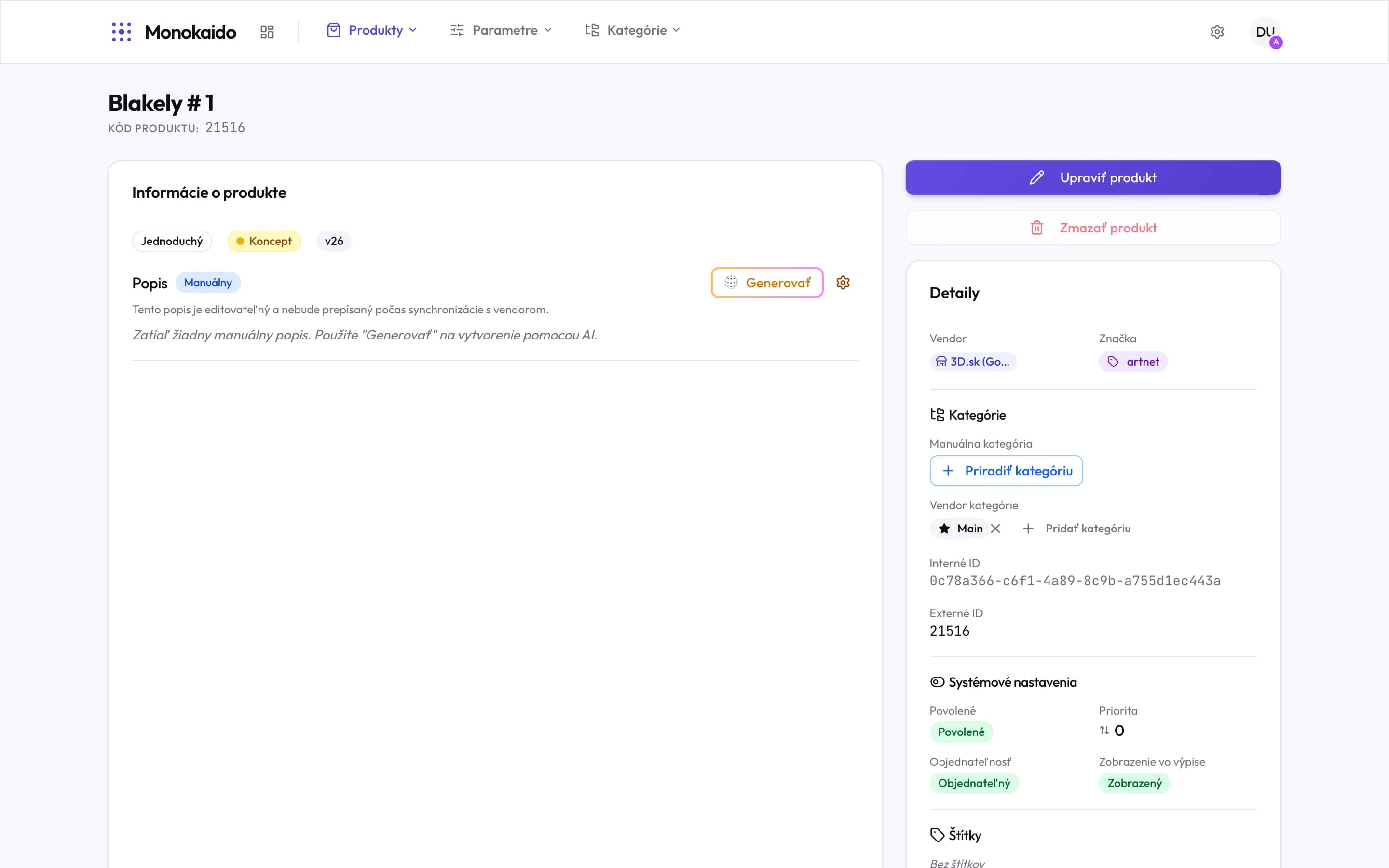
Controls on this screen
- Name and product code — The code is the feed identifier — what the product is matched by on every later import.
- Edit product — Opens the editor. The only route to a manual change runs from here.
- Type — Set automatically from the number of variants; only Bundle / Digital are chosen by hand (informational).
- Status — Draft, published or archived.
- Description origin — "Manual" means a person or the AI wrote it — and that an import will not overwrite it.
- Generate — Has the AI write a description from the name, parameters, brand and category.
- Vendor — Which feed the product came from.
- Brand — The unified manufacturer brand.
- Manual category — Your category. Nothing here means the product is unmapped.
- Vendor categories — Categories as the feed sent them. The star marks the primary one.
- Internal ID — Monokaido's identifier. This is the one that appears in the page address and the API.
- External ID — The vendor's identifier.
- Enabled — Your decision that the product may be sold.
- Visible in listings — Whether the shop actually shows it — a product can be enabled and still hidden.
Where each value came from
This is the main question the detail answers:
| Marker | Means | Consequence |
|---|---|---|
| Manual | A person or the AI wrote the value. | An import will not overwrite it. This is what protects your work. |
| From the feed | The vendor sent the value. | It can change on every import. |
| From a rule | A flow step set the value. | The next run sets it again — see Product flows. |
More actions (⋯)
Next to the Edit product button sits the ⋯ menu with the actions you do not need every day:
| Item | What it does | Who sees it |
|---|---|---|
| Instagram / Facebook post | A branded image from the product photo, AI post text and publishing to your Page — see Social media. | Editors and administrators |
| Delete product | Deletes the product for good. Only an archived product can be deleted — otherwise the item is disabled with the reason under it. | Administrators |
Someone who can only view products has no ⋯ menu.
Parameters: row actions
The Parameters table has one row per value and, at the end of each row in the Action column, a ⋯ menu of its own. Editors and administrators see it, and it holds only what can actually be done with that value.
| Item | What it does | Good to know |
|---|---|---|
| Map value | Replaces this spelling of the value with another, or keeps a value from the feed out altogether — the shop, the feeds and the ERP get the new value, or none. The rule applies to this value on every product of the vendor (or of all vendors), not only on this one. More in Value mappings. | On a value that already has a mapping the item reads Edit value mapping. In the dialog you also pick the vendor the rule applies to. |
| Map parameter | Moves values under another parameter — for two parameters that mean the same thing. | What exactly moves depends on who wrote the value. |
| Suppress value | Removes the value from the product, the shop, the feeds and the ERP. Later syncs do not add it back. | It can be restored at any time on the Suppressed tab. |
The Parameter column shows in bold the parameter the value is stored under (for a value nothing has stored yet, the parameter the sync writes it into), with its code. When another feed name brought the value, that name is shown next to it in grey. On a parameter several feed names write into (say seven EMOS rooms into “Vhodné do miestnosti”) every value thus shows where it came from. The product stores one value of a parameter once, under one feed name; the table does not list the other feed names carrying the same value on their own.
A feed value that a parameter mapping moves into another parameter only at the next sync is in the state Awaiting sync and shows under its name where it goes — for example “→ Vhodné do miestnosti · after the next sync”. A value nothing has stored yet is in the same state right under the parameter the sync writes it into, with no arrow. A value that a Don't carry this value over rule drops at that sync shows “→ Vhodné do miestnosti”: the parameter goes there, the value nowhere. When only some of a parameter's values move (say a value from a product merge or one a person wrote stays), every value says its own way, and the one that stays says “stays”.
On a feed value that a parameter mapping brought into the parameter, the Map value dialog also offers the Scope of the rule: whether the rule applies only to the feed parameter or to the whole parameter — see Value mappings.
A feed value kept out by a Don't carry this value over rule shows in the table in the state Not carried over, greyed out and struck through, with “Value mapping: Not carried over” under the value; its Origin column shows Value mapping. Hovering over the state names the parameter whose rule decides it, or says the value stops being carried over only at the next sync — until then it is still sent. The row stays in the table even after the stored value is removed, so that Don't carry this value over can be unticked through Edit value mapping. It has no Suppress value item: the rule already keeps the value out (at the latest from the next sync), so there is nothing to suppress.
Map parameter follows the Origin column:
| Origin of the value | What moves | What holds from then on |
|---|---|---|
| Import | The values of that same feed parameter — by your choice from one vendor only (Only vendor …) or from all of them (All vendors). | The parameter mapping is saved too, so later syncs write the values straight under the target parameter. The value mappings of the feed parameter keep applying, and come first. |
| AI or Manual | The values of this parameter that the AI or a person wrote — across the whole company, not only on the open product. | No mapping is saved. Feed values under the parameter stay; they are mapped from their own row. |
A value written by a rule or by the system has no Map parameter item — they would write it again. On a row in the Unmapped state only the mapping is saved, and the next sync writes the value. All vendors does not move the values of a vendor that has a mapping of its own for the same name — that one takes precedence.
A move of AI or manual values does not reach the derived products of a split: the values the AI or a person wrote on them do not move and have no Map parameter item. The dialog counts them among the values that stay under the parameter.
Once you pick an existing target parameter, the dialog says before you confirm
how many values will move and how many will merge: when a product already
has exactly the same value under the target parameter, the two rows become one.
Another spelling (Áno and áno) stays a value of its own. If a feed
parameter mapped into the target parameter has value mappings of its own,
Monokaido recalculates the touched products' values from the stored feed data
after the move, so a rule's result (say “áno” → “Kancelária”) comes back as a
value of its own. The message after you confirm says whether the
recalculation is done, still running (with many products this can take a few
minutes; the table refreshes by itself meanwhile, and if the values still have
not changed, reload the page) or failed — then the next sync recalculates the
values. A
product without stored feed data gets the rule's result only at the next sync. A
value you have
suppressed under the target parameter does not get there: a feed value is
removed, a value from the AI or a person stays where it is. The dialog also
says what happens to the value you opened it from. It then names the
parameter-mapping rule that will be created or updated (or says it already
exists), where to find it (Parameters → Parameter Mappings) and where the
next syncs will write the values. For values from the AI or a person it warns
that no rule is created and the values move once.
When templates list the parameter, the dialog names them and offers Replace it in the templates: the original parameter is replaced there by the target one. The option is ticked in advance when no value is left under the original parameter after the move. While a template lists the original parameter, the AI fill writes it again on products that lack it. When templates are assigned automatically by this parameter, the dialog warns that this stops once the values move.
System settings
| Field | What it does | Note |
|---|---|---|
| Enabled | Whether the product may go on sale at all. | Your decision. |
| Orderable | Whether it can be ordered. | Tied to stock and to the overselling setting. |
| Visible in listings | Whether the shop shows it. | It can be hidden by a rule, or by being the secondary side of a merge. |
| Priority | Its position in listings. | Higher priority comes first. |
I changed the description and after the import it is the old one again.
The description was not marked manual. Editing through the editor marks it; changing it another way does not.
The product is enabled but not in the shop.
Check Visible in listings, whether its category is active, and whether the product is the secondary side of a merge.
Where is the change history for this product?
In Changes to review, which can be filtered to one product.