

Product flows
The chain of steps a product goes through after import — what can be added, in what order, and how a flow is run.
An import creates the product. Everything after that — filing it, filling in parameters, writing a description, translating — are steps somebody has to perform. A flow is that list of steps in order, plus the trigger that starts them.
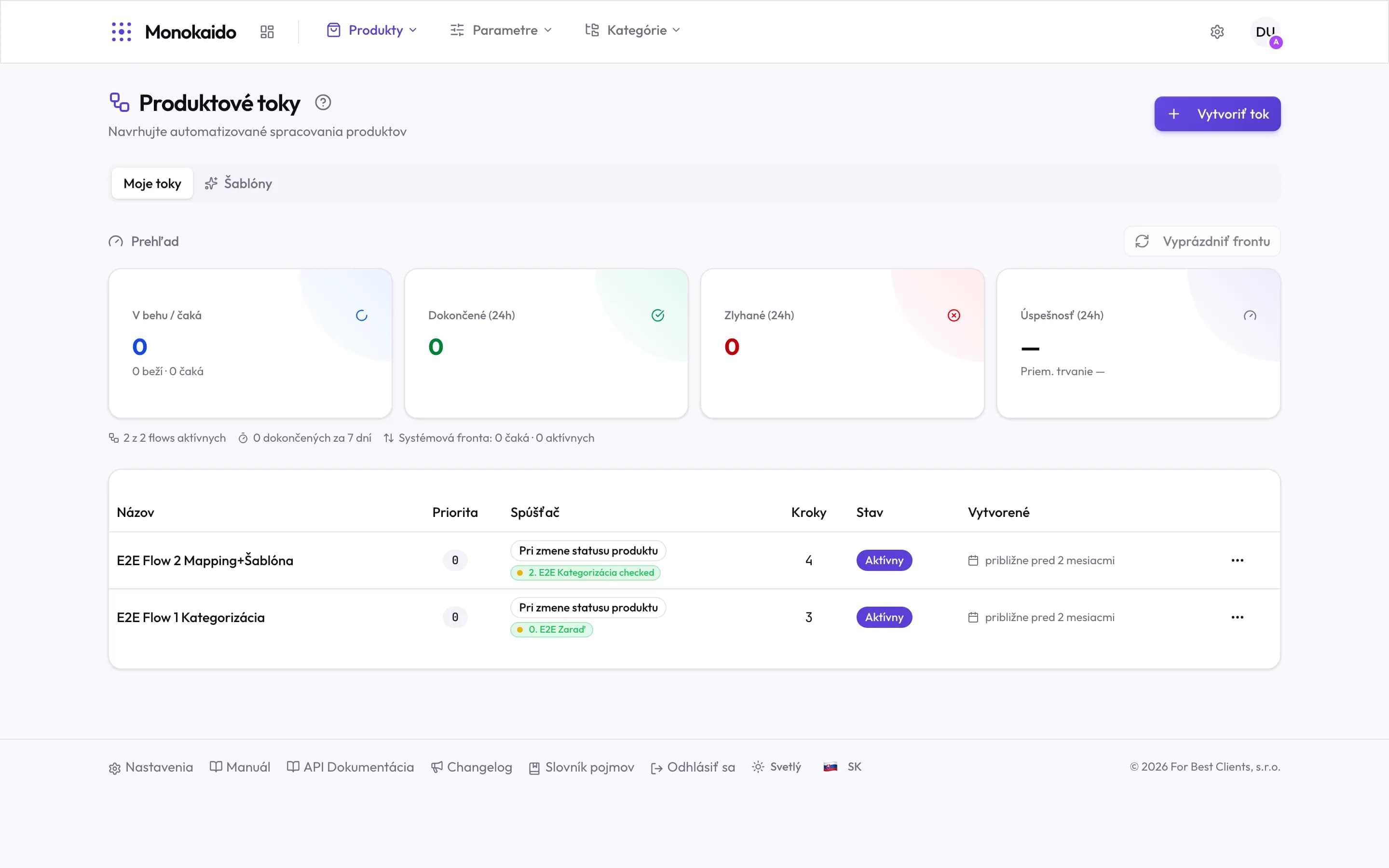
Controls on this screen
- Create flow — Opens the editor: a trigger plus a sequence of steps.
- My flows — The flows you have set up.
- Templates — Ready-made flows for the usual scenarios — a faster start than an empty one.
- Clear the queue — Discards waiting runs. For when the queue has silted up and you want a clean start.
- Running / waiting — How many runs are in progress and how many are queued.
- Completed (24h) — How many runs finished in the last day.
- Failed (24h) — A non-zero figure is the one reason to open this screen uninvited.
- Success rate (24h) — The share that completed, plus the average run duration.
- Summary line — How many flows are active, and the state of the system queue.
- Trigger — What starts the flow — a product status change, for instance.
- Trigger condition — The specific state that fires the flow.
- Steps — How many steps the flow contains.
- State — An inactive flow stays configured but never runs.
What a flow is made of
| Part | What it decides | Note |
|---|---|---|
| Trigger | When the flow starts. | Typically a product status change — the moment the product is ready for that step. |
| Steps | What runs, and in what order. | Filing into a category, applying a template, filling in parameters, an AI description, translation, an email. |
| Priority | The order between flows when several fire at once. | |
| State | Active or inactive. | Disabling is safer than deleting — the configuration is kept. |
Email from a flow
The Send Email step sends an email with the subject and content you set on it. Recipients come from two places:
- Team recipients are members of your team in Monokaido. You tick them in a list.
- Additional emails (comma-separated) are any addresses outside the team. Malformed addresses are dropped.
A separate email goes out for every product that passes through the step, naming the flow and the product. A hundred products therefore means a hundred emails for each recipient.
How a flow runs
Automatically, from its trigger
A product reaches the state the flow watches and joins the queue.
By hand over a selection
A flow can be run over a specific set of products when you do not want to wait for the next import.
Runs are processed through a queue, not all at once. On large catalogues it is normal for the queue to hold hundreds of items and work through them gradually — you can watch it in Background processes (Opens in a new tab).
The flow is active but nothing happens.
Check the trigger: if it watches a status change, the product has to actually reach that status. Flows do not fire "anyway" on every import.
Failed runs — where is the reason?
In the run detail. It carries the step it stopped on and the message.
Can a product be in several flows at once?
Yes. Priority then decides, and it is worth checking that two flows are not overwriting the same field.
What does “Clear the queue” do?
It discards waiting runs. Changes already processed remain — clearing is not an undo.