

AI settings
Monokaido AI versus your own key, monthly and permanent tokens, top-ups, and limits.
On this page
This screen decides two things: which AI features you have and who pays for them. Everything else about AI in Monokaido follows from here.
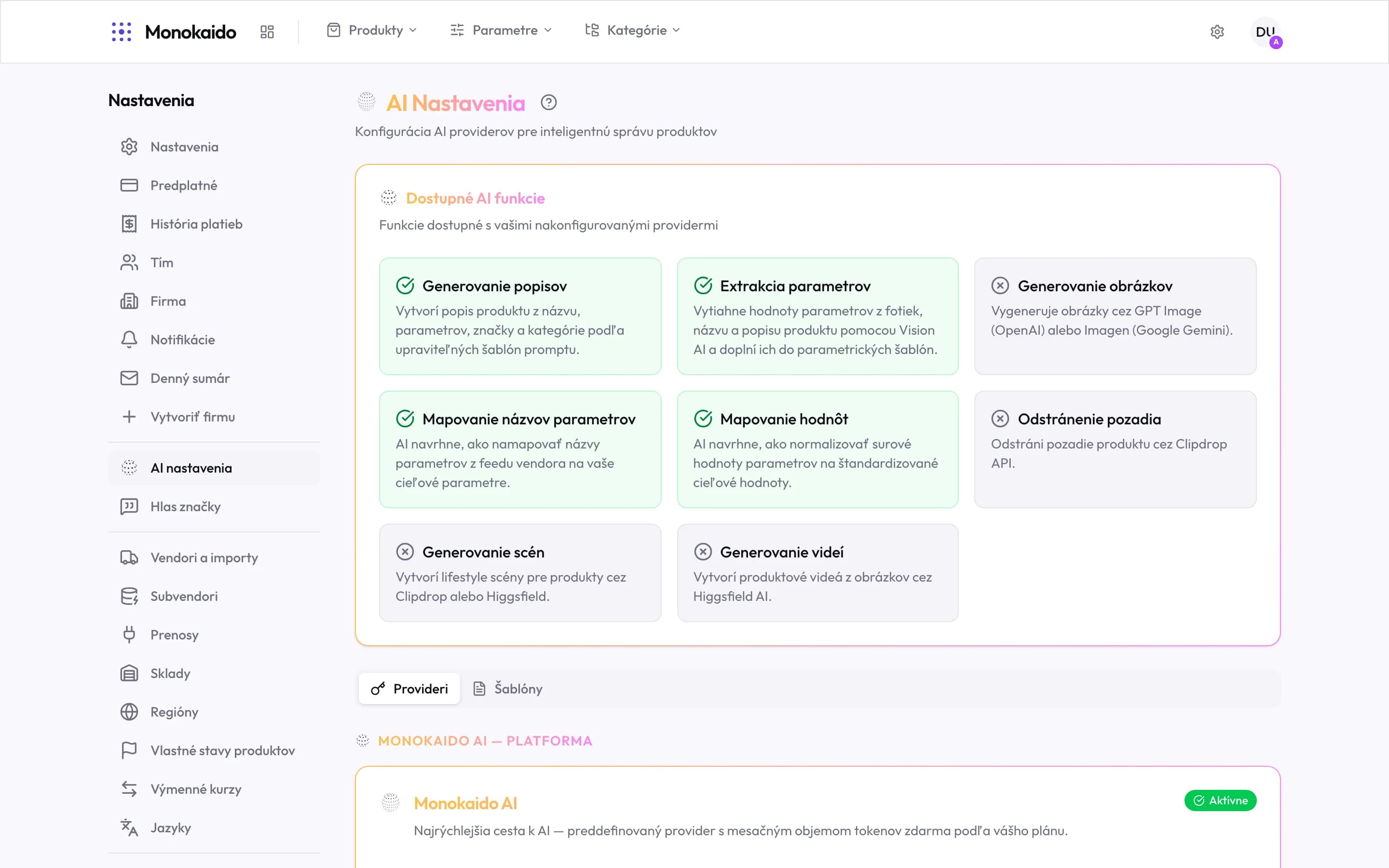
Controls on this screen
- Available AI features — The grid is not a brochure — it is a status. Green means usable now; grey means a provider is missing.
- Description generation — Writes a product description from the name, parameters, brand and category.
- Parameter extraction — Pulls parameter values out of photos, the name and the description.
- An unavailable feature — A grey card with a cross names the provider you need to configure to unlock it.
- Parameter name mapping — Proposes how to match feed names to your parameters.
- Value mapping — Proposes how to normalise raw values onto your own list.
- Providers — Who handles the AI requests, and on what terms.
- Templates — The prompt texts each feature uses. They are editable.
- Monokaido AI — The platform provider — AI without an API key of your own.
- Provider state — "Active" means requests are going through it.
Two routes to AI
| Route | How it works | When to choose it |
|---|---|---|
| Monokaido AI | The platform handles the requests for you. No API key and no account with an AI provider. | The default. One switch turns it on and you immediately have the monthly token allowance from your package. |
| Your own provider | You supply an API key (OpenAI, Anthropic, Google and others) and pay the provider directly. | Right when you already have a key, want a specific model, or have your own pricing agreement. |
The two can be combined: some features (background removal, scene generation) need specialised providers that Monokaido AI does not replace. That is why the grid at the top always tells the truth about what is usable right now.
Changing the AI model
With the ChatGPT, Claude or Gemini provider you also choose the model that handles the requests. With Monokaido AI the platform sets the model, so there is nothing to choose.
Open the provider settings
Click Settings on the provider card. Only an Admin sees the button. If the provider is not set up yet, the button reads Configure, and you can pick a model only once the API key is saved.
Pick the model
Choose a model in the Default Model field and save.
Once a day Monokaido checks that the model you set is still offered by the provider. When the provider retires it, or your API key loses access to it, Monokaido switches to the newest model of the same family, or to the provider's recommended model if none is left in that family. The AI features keep running. Everyone in your company gets an email about the change, and the provider card shows a notice. The new model may differ in price and output quality. If it does not suit you, pick another one the same way.
How tokens are counted
Monokaido AI keeps two separate pools, and it matters which one is spent first:
The monthly allowance from your package
Refills at every subscription renewal. Whatever is left over expires — it does not carry into the next period.
Permanent credit
Tokens you bought, received from a coupon, or were granted by support. These never expire.
Features draw from the monthly allowance first, and only from permanent credit once it runs out. The order is deliberate: what would otherwise expire is spent first.
Prompt templates
The Templates tab holds the texts the AI works from. They are editable, which is the cheapest way to change the output without changing provider — adding an instruction that a description must never quote a price, for instance. The templates for Instagram and Facebook post text can also be edited right in Settings → Social media.
Oversight and cost
- AI logs — every individual call, its result and its cost.
- AI accuracy — how often people correct the output.
- Payment history (Opens in a new tab) — invoices for purchased credit.
Do I need my own API key?
No. Monokaido AI is a platform provider — switch it on and it works. Your own key is a choice, not a requirement.
Why is a feature grey even though Monokaido AI is on?
That feature needs a specialised provider Monokaido AI does not cover — background removal or scene generation, for example. The card names which one.
Do unused tokens carry over?
The monthly allowance does not; it expires at the end of the billing period. Purchased permanent credit does — it stays until you spend it.
Who may change these settings?
Admin. An Editor can use the AI features but cannot change providers or buy credit.