

System overview
Parameter coverage across the catalogue: what is mapped, what is missing, and where it hurts most.
Available to roles Admin, Editor, ViewerOpen in the app (Opens in a new tab)
This is the one screen in the application that answers "what should I work on first?". It does not sort parameters alphabetically but by how many products they affect — so the first row of the list is always the best-spent hour of work.
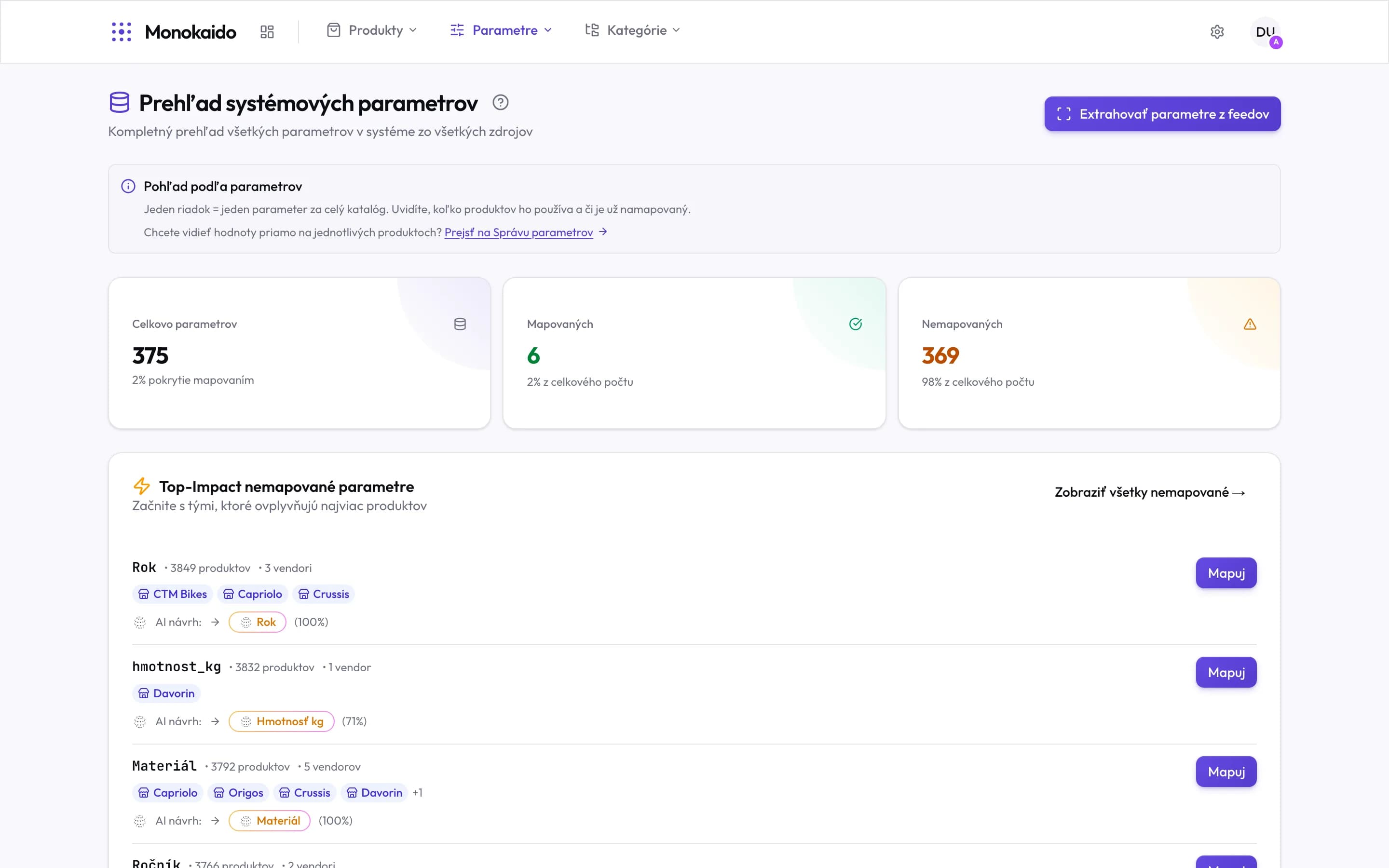
Controls on this screen
- Extract parameters from feeds — Walks the feeds and adds names that have appeared since.
- Go to Manage parameters — This screen is a view of a parameter across the whole catalogue. The values on individual products are elsewhere.
- Total parameters — How many distinct parameter names the system knows from all feeds.
- Mapped — How many of them have a target parameter.
- Unmapped — The rest. A high figure is not a fault — it is work not yet done.
- Top-impact unmapped — Ordered by the number of products affected, not alphabetically. This is the order worth working in.
- Name and impact — The raw feed name, the product count, and how many vendors send it.
- Vendors — Which feeds use this name. More vendors = one mapping helps several.
- AI suggestion — The target parameter the AI proposes, with its confidence. Still only a proposal.
- Map — Opens the mapping for this name. The shortest road from finding to fixing.
Reading the figures
| Field | What it does | Note |
|---|---|---|
| Total parameters | The number of distinct names that arrived from all feeds. | It grows with every new vendor. A high number is not itself a problem. |
| Mapped | How many have a target parameter. | This is the only figure you want to see rise. |
| Unmapped | The rest. | Their values are stored as raw data, but nothing can be filtered by them and they do not appear in the shop. |
| Mapping coverage | The share that is mapped. | The same figure appears on the dashboard. A low percentage on a new catalogue is a normal state, not a fault. |
98 % of mine are unmapped. Is something broken?
No. It means the catalogue is fresh and normalisation has not been done yet. Start with the first row of the top-impact list.
How is this different from Manage parameters?
This screen is a view of a parameter across the catalogue. Manage parameters is a view of the values on individual products.
When should I use “Extract parameters from feeds”?
When a vendor has been added, or an existing feed started sending new fields. It adds names the system had not seen before.