

Parameter mappings
Matching names from feeds to your parameters — AI suggestions, confirmation, and what happens to the unmapped.
The feed says Barva, column_33 or farba-produktu. Your catalogue has a
parameter called Colour. This screen is where one is joined to the other —
and without it the system does not know they are the same thing.
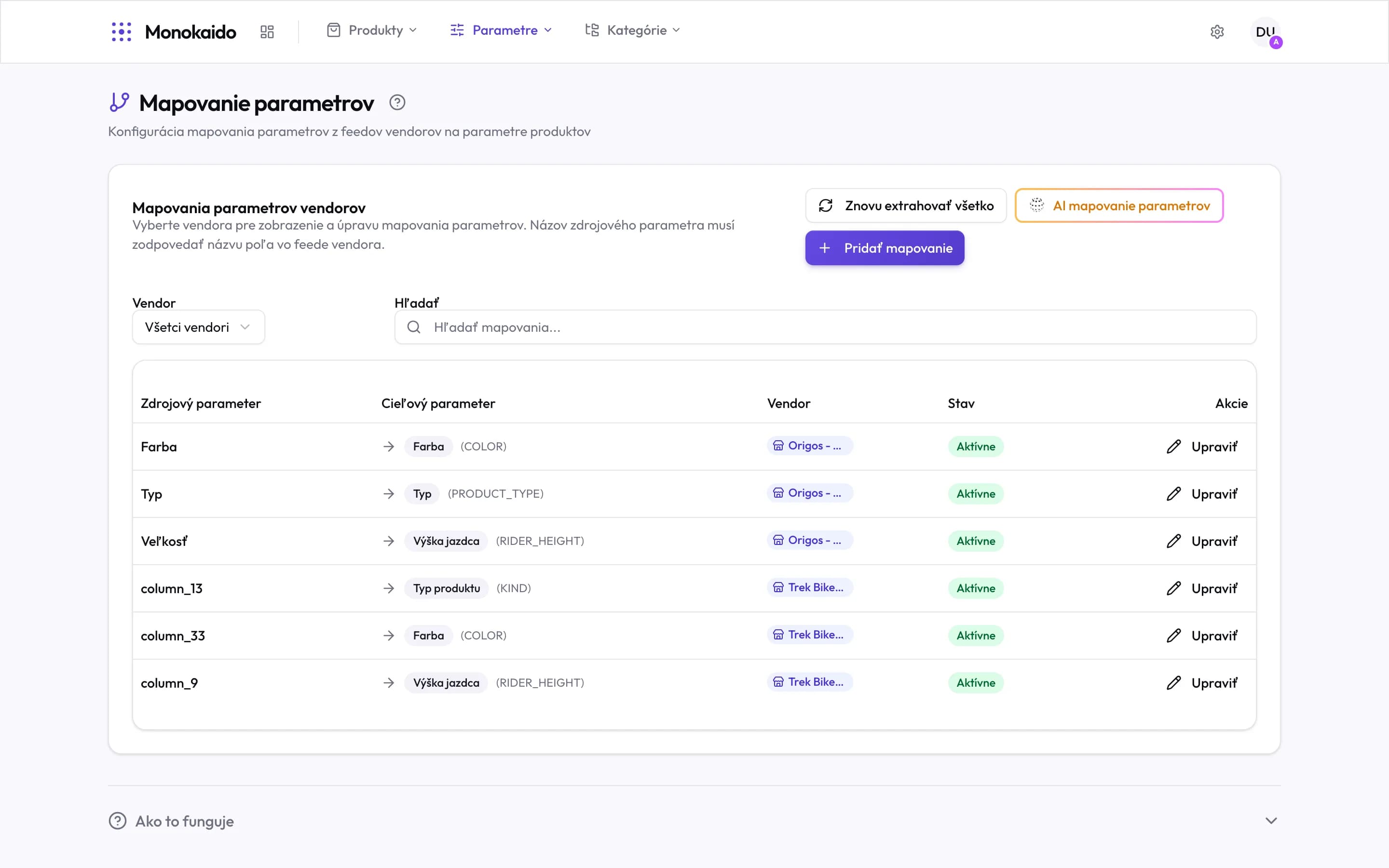
Controls on this screen
- AI parameter mapping — Has the AI walk the unmapped names and propose matches. It confirms nothing on its own.
- Re-extract everything — Walks the catalogue again with the current mappings. Use it after a substantial change.
- Add mapping — Matching one name by hand.
- Vendor — Narrows the list to one vendor's mappings. A mapping is either for one vendor or global, for all of them.
- Search — At hundreds of mappings this is the fastest way to one row.
- Source parameter — The field name from the feed. A sync compares it ignoring case, diacritics and leading or trailing spaces.
- Target parameter — Your parameter, where the value will be stored.
- Parameter code — The target parameter's internal code — what you will see in exports and in the API.
- Row vendor — Which vendor this mapping applies to. “Global” means all of them.
- State — Administrators and editors have a switch here that turns a mapping off and back on without deleting it; someone who can only view sees just the state. A mapping that is off is used neither by a sync nor by an extraction.
- A technical name — CSV feeds often have no header and their fields are called column_13. A mapping is the only place that becomes a meaningful parameter.
How mapping is done
Let the AI propose
AI parameter mapping walks the unmapped names and matches what it can. It confirms nothing — you review and approve the proposals.
Fill in what it could not
Meaningless technical names (
column_13) and abbreviations only the vendor understands have to be matched by hand through Add mapping.Run the extraction
Re-extract everything walks the catalogue with the new mappings and fills the values in. Without this step the mapping takes effect only on the next import.
A mapping also remembers the feed name's own parameter by itself — the one a sync stored the values under while the name was unmapped. It looks for it when the mapping is created and when its name or target changes. When there is one and it is not the target itself, the chip Values from: … · N rules sits under the source name: that parameter's value mappings apply to the feed values first, the target parameter's only to the rest. More in Value mappings.
Comparing two vendors
When two vendors send the same properties under different names (Barva and
Farba, Hmotnost and Hmotnosť), you do not have to pair them one by one.
The Compare vendors button opens a screen where AI compares the parameters
of two vendors at once, and you join every pair that fits into one parameter
with one click.
Pick the vendors
The first is the vendor whose parameters you want to unify — the mappings are created for it. The second is the vendor whose parameters you already use; its products do not change. The How it works block shows at once which way the mapping goes. Show both vendors' parameters shows what AI will go through (parameters without a mapping), what is already shared and what already has a mapping.
Find matches
Propose pairs starts AI: it compares the names and sample values and proposes a parameter of the second vendor for each parameter of the first, with high, medium or low confidence. Nothing is created yet. You can confirm the proposals that arrived while AI works on the next ones. New ones join the list only when you click Show … new proposals — the rows you are working on never move under your hand. Edit the prompt in the AI Prompt section or in the prompt gallery of the AI settings (type "Vendor parameter match").
Confirm the pairs
The proposals are sorted by confidence, and each shows sample values of both sides. Confirm a pair that fits with Create mapping — the mapping is created right away, the same one Add mapping creates. You can change the target parameter by hand, also for a parameter AI found no match for. Skip a pair that does not fit; you can restore it on the Skipped tab.
Several pairs at once
Tick the pairs (for example with Tick all with high confidence) and click Create … mappings in the bar at the bottom. You see the list of every pair and confirm it before anything is created.
Load the values
The values of the first vendor's products move at its next sync, or right away with Load values now from the feed data already downloaded — even when several feed names map onto one parameter.
Next to the name of a first-vendor parameter whose values are already stored there is a Map values link — in the proposals and in the Show both vendors' parameters list. It opens Value mappings for that parameter and that vendor in a new tab, so you can unify its feed values right away while the proposals here stay as they are. For a parameter that already has a mapping, the link opens its own feed parameter: its rules apply to the values first.
A created mapping cannot be undone on this screen. You can switch it off on the Parameter mappings page; an admin can delete it.
If a parameter got a mapping elsewhere in the meantime (in another tab, from another user), the screen says so on the pair — naming the parameter — and creates nothing new. You find such a pair on the Skipped tab.
The screen remembers proposals in progress in this browser tab. If you close or reload it by mistake, you continue where you left off for the same pair of vendors. The state of the proposals is checked against what the vendor holds now. Mappings still being created finish even after you leave the page; while any are waiting, the browser asks before the tab is closed.
What happens to the unmapped
A value whose name is not mapped is not thrown away. By default a sync
still stores it on the product — under the parameter that matches its name in
the feed. If you have no such parameter yet, the sync creates one automatically
and names it as the feed does. Nothing joins that parameter to yours, though:
Barva from the feed and your Colour stay two parameters, and a filter by
one does not find the products whose value sits under the other. If automatic
parameter creation is switched off both for the vendor and for the whole
company, the value is not stored on the product and stays in the raw feed data
alone. Nor is a value stored when a value mapping of that parameter says
Don't carry this value over for it.
In each of these cases the name still counts as unmapped — in the mapping coverage too. How many there are is in System overview; the specific values are in the product's raw data.
When should a mapping be for one vendor and when global?
A mapping is either for one vendor or global, for all of them — in the
Add mapping dialog you pick a vendor or the option
Global (all vendors). Global is enough when the name means the same thing
to everyone. When it does not — Size might be frame size for one vendor
and package size for another — give that vendor a mapping of its own: it
takes precedence over the global one.
I deleted a mapping — do I lose the values?
Not right away. The confirmation says the same for a delete and for switching a mapping off: stored product values do not change right away and stay under the target parameter; variant options shown through this mapping change at once; on the vendor's next sync the feed's values are written where their feed name leads without this mapping — to the parameter of another valid mapping, otherwise to the parameter of the same name; values copied by a product merge and values written by the AI or by a person stay under the target parameter. After a delete, unless another mapping that is switched on still covers it, the feed name goes back onto the Unmapped tab in Managing parameters and is from then on treated like any unmapped name — see What happens to the unmapped above. Only an administrator can delete a mapping — with the bin at the end of its row; an editor can also switch it off, and back on at any time.
The target parameter I need is not in the list.
It has to be created first, in Parameter definitions.