

AI accuracy
How often people correct the AI's output and what that says about your settings.
The question "is the AI getting our parameters right?" has a numeric answer here. It is measured on your own data: the application takes what the AI once extracted, compares it against the values the products hold today from people or from the feed, and counts the matches. No new AI calls are made — an evaluation costs nothing.
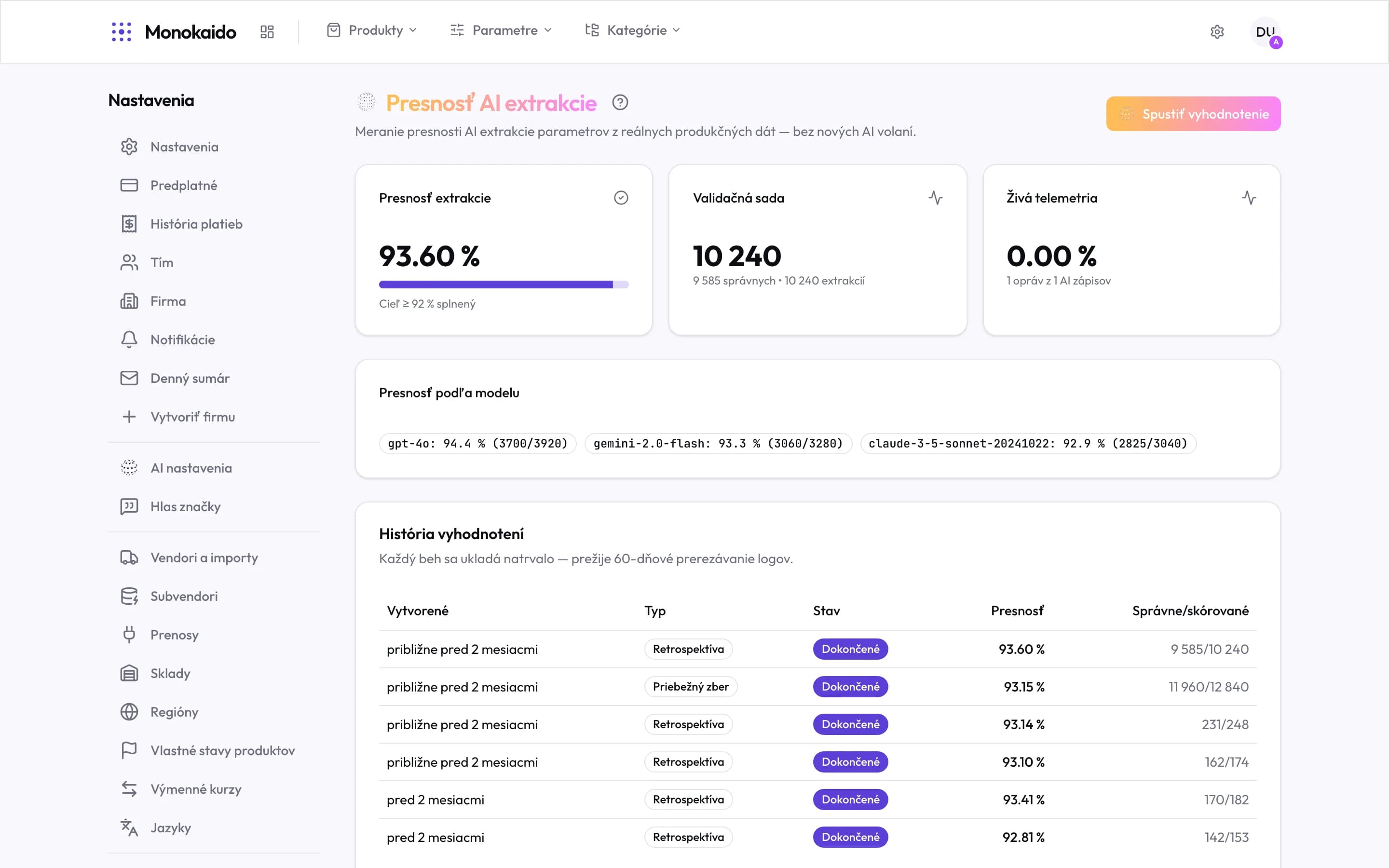
Controls on this screen
- Run evaluation — A retrospective run over the logs you already have. It runs in the background and spends no tokens.
- Extraction accuracy — The share of predictions that matched the correct value. The headline number.
- The 92 % target — A fixed bar. Below it, act on the settings rather than wait.
- Validation set — How many extractions had anything to be compared against. A small set means an uncertain number.
- Live telemetry — A different metric: how many AI writes someone overwrote by hand. It measures reality, not retrospect.
- Accuracy by model — The same task across models. This is the evidence for deciding which model to use.
- History is never pruned — Runs survive the 60-day log prune, so the trend over time stays intact.
- Run type — Retrospective = a one-off replay of history. Continuous harvest = one run that keeps extending.
- Correct/scored — The denominator matters more than the percentage. 142/153 is a different confidence from 9,585/10,240.
Where the "correct value" comes from
An evaluation needs something to compare against. It takes it from what the system already holds:
| Source | What it is | Weight |
|---|---|---|
| Manual value | A parameter a person filled in or corrected. | Highest — a person looked at the product. |
| Feed value | A parameter that came straight from the vendor. | Lower than manual, but dependable. |
| Verified value | An explicitly confirmed reference value. | The highest of all — it overrides both of the above. |
Three metrics not to confuse
| Metric | What it measures | When to trust it |
|---|---|---|
| Extraction accuracy | Agreement between a prediction and a known correct value. | When choosing models and prompts. |
| Validation set | The size of the sample the accuracy was computed on. | Always — without it the percentage is unreadable. |
| Live telemetry | The share of AI writes someone later overwrote by hand. | When you want to know what the team thinks of the AI. |
Run detail
Clicking a row in the history opens the evaluation detail: a list of mismatches with the parameter, what the AI predicted, and the correct value (up to 100 are shown). This is the fastest route to why accuracy is low — mismatches almost always cluster around a handful of parameters.
Run an evaluation
With the button at the top right. It runs in the background; you can leave the screen.
Open a completed run
Click its row in the history. You get the summary and the list of mismatches.
Find the recurring parameter
If the same parameter keeps coming back in the mismatches, the problem is not the model.
Act where the problem starts
Add the values to the dictionary in the parameter definition, tighten the value mappings, or exclude the parameter from automatic filling.
Does an evaluation spend tokens?
No. It replays logs that already exist — it calls no AI. That is why it can be run repeatedly.
What is the difference between a retrospective and a continuous harvest?
A retrospective is a one-off run over a chosen period. A continuous harvest is one run per company that keeps extending with new data — which is why it carries the largest numbers in the history.
Accuracy dropped after a model change — should I revert?
Look at Accuracy by model first: it compares the same task across models. A difference within one percent on small samples is not a reason to change anything.
The screen says extraction is not configured.
The company has no AI provider. Set one up in the AI settings — without it there is nothing to measure.