

Changelog
What has been added and changed in the application — filtered by type, module and period.
Available to roles Admin, Editor, ViewerOpen in the app (Opens in a new tab)
On this page
Monokaido changes continuously and does not wait for big releases. The changelog is the record of those changes — not a marketing round-up but a list of what actually happened, with the date.
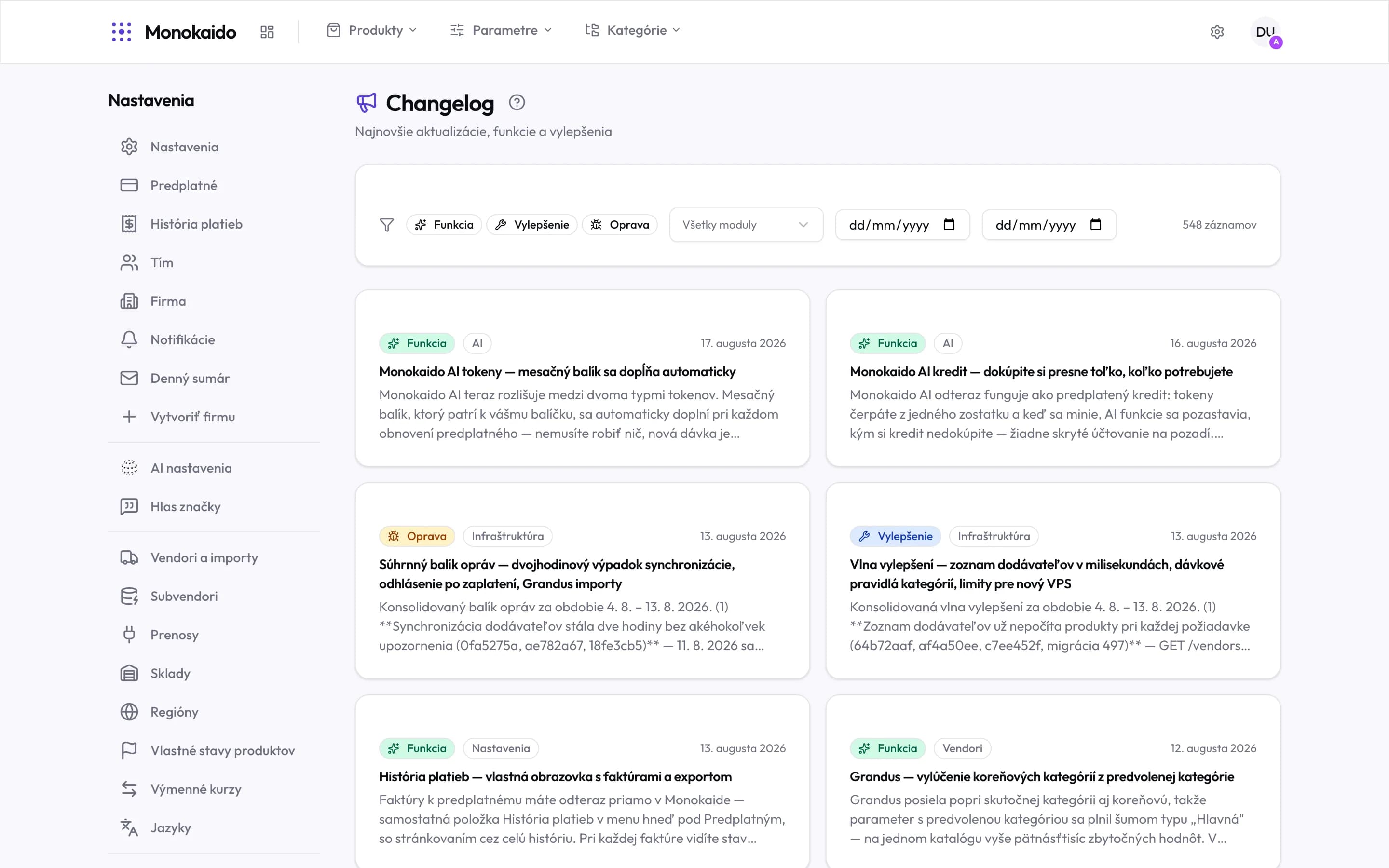
Controls on this screen
- Change type — Feature, Improvement, Fix. They can be switched on together.
- Module — Narrows the list to one area — products, parameters, AI, ecommerce, infrastructure and more.
- From — The start of the period. Useful after a longer absence.
- To — The end of the period.
- Entry count — How many entries match the current filters.
- Type badge — Colour and icon separate a new feature from a fix at a glance.
- Module badge — Which part of the application the change concerns.
- Date — When the change landed.
- Opening an entry — A card shows the opening of the text; clicking opens the whole entry.
Types of change
| Type | What it means | Why it is worth noticing |
|---|---|---|
| Feature | Something that did not exist before. | A new item may appear in the menu. |
| Improvement | An existing thing works differently or better. | This is where an established routine most often changes. |
| Fix | Something that did not work now does. | If you reported a problem, its resolution shows up here. |
Where you meet the changelog
| Place | What is shown |
|---|---|
| The sign-in screen | The latest entries, before you even sign in. |
| The dashboard | A “What's new” panel with a link to the full list. |
| The footer | The link to this screen. A green dot means something landed today. |
Can the whole team see the changelog?
Yes, the Viewer role included. It is not a setting, it is information.
I got a message about too many requests.
Clicking through the filters quickly hits a protective limit. Wait a moment and try again — nothing is broken.
Why are some entries summaries covering several days?
Small fixes and improvements are consolidated into one entry per period, so the list is not filled with items nobody would read on their own.