

Articles
Writing and editing an article, images, linking to products, and publishing.
The article list is the blog's workbench: drafts, items awaiting approval and published pieces in one place. The article detail is the editor.
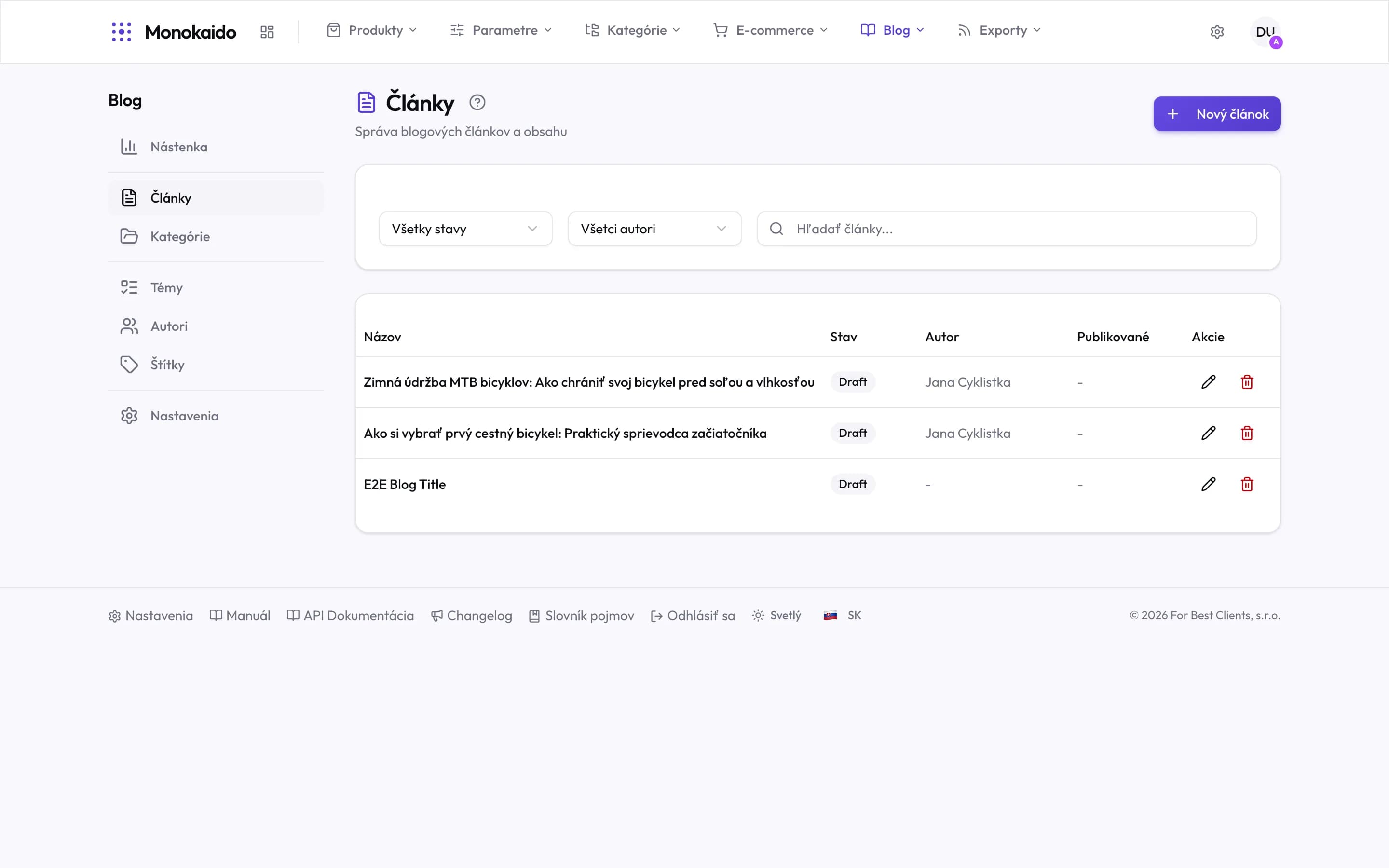
Controls on this screen
- New article — Opens the editor on an empty article. AI articles arrive here on their own.
- Status — Draft, published, scheduled. When reviewing content, start with drafts.
- Author — Filter by author — AI authors included.
- Search — By article title.
- Title — Click to open the article. The title is also what the reader and the search engine see.
- Status — Draft means the article exists but is not in the shop.
- Author — A dash means an article with no author assigned.
- Published — The publication date. A dash on a draft is normal.
- Actions — The pencil opens the editor, the bin deletes the article.
Article states
| State | What it means | Who moves it on |
|---|---|---|
| Draft | Work in progress. Not in the shop. | Anyone with edit rights. |
| Awaiting approval | A generated or finished article waiting to be checked. | Appears when approval mode is on. |
| Published | Live in the shop at its address. | Publishing can be scheduled for a later date. |
| Archived | Withdrawn from the shop but kept. | Its address stops working. |
What an article is made of
| Field | What it does | Note |
|---|---|---|
| Title | The heading, and the basis of the article's address. | The address derives from the title; change it after publishing only deliberately — old links stop working. |
| Standfirst | The short summary used in listings and in share previews. | Without one the opening of the text is used, which is usually worse. |
| Body | The text itself, with formatting and images. | |
| Section and tags | Where the article is filed. | One section, several tags — see Sections and Tags. |
| Author | The byline. | Profiles are managed in Authors. |
| Linked products | Products shown alongside the article. | This is why the blog lives inside a PIM: the reference points at a live catalogue product, not at text. |
| Lead image | The image for listings and share previews. |
Generating and editing
An article can be written by hand or generated from a topic. Generated text is always a proposal — read it and edit it. The AI writes in the tone you set in Brand voice.
I changed the title of a published article. Does the address change?
The address derives from the title, but it does not change on every edit. If you do change it, old links stop working — not worth it on an article somebody has already shared.
How do I schedule publishing for next week?
By setting a publish date. Until then the article stays out of the shop.
Can an article be written in several languages?
Yes, for the languages you have in Settings → Languages (Opens in a new tab).