

The category tree
Your own tree: creating, moving, activating a branch, and the settings children inherit.
On this page
Categories in Monokaido are two separate things, and most confusion comes from treating them as one:
- Vendor categories arrive in a feed. You do not change them — they are as the vendor sent them, and every vendor's are different.
- Your categories are a tree you build yourself. The shop looks the way this tree does, and parameter templates attach to it.
Between the two sits mapping. This screen is about the second one — your tree.
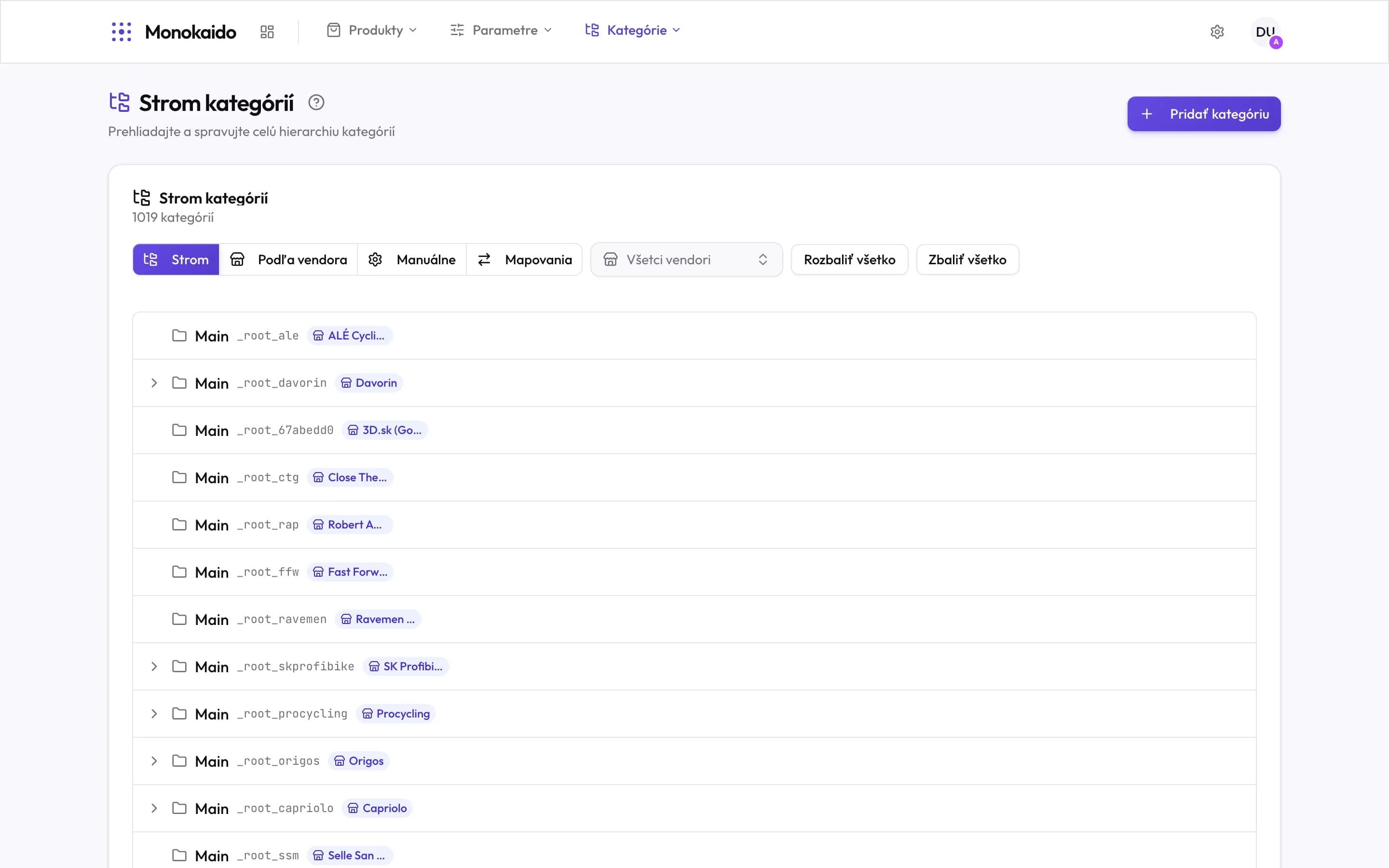
Controls on this screen
- Add category — Creates a node. You pick its parent in the dialog.
- Category count — The total across every branch. A sudden jump usually means a feed brought its own tree.
- Tree — The whole hierarchy as it stands.
- By vendor — The same thing, grouped by vendor.
- Manual — Placing products into a category by hand.
- Mappings — Matching a vendor's categories to your tree.
- Vendor filter — Leaves only one vendor's branches in the tree.
- Expand all — Unfolds the whole hierarchy. At a thousand categories that takes a moment.
- Expand arrow — A node without an arrow has no subcategories.
- Category code — The identifier the feed and any export know this category by.
- Vendor — Which feed the branch came from.
Changing the tree
Adding a category
Add category creates a node; you choose the parent in the dialog. With no parent it becomes a new root.
Moving
A node is moved by dragging. It takes its whole subtree with it — children follow the parent.
Activating and deactivating
An inactive category does not appear in the shop. The dialog offers a choice that applies the state to the whole subtree at once.
What children inherit
| Field | What it does | Note |
|---|---|---|
| Parameter template | The prescription of which parameters a product in this category should carry. | Subcategories without a template of their own inherit it. It is applied through a flow action. |
| State (active/inactive) | Visibility in the shop. | Inherited only when you tick "apply to subtree"; otherwise each category owns its state. |
| Parameter instead of subcategories | The shop renders a parameter's values in place of subcategories. | Each tile leads to this category with a single active filter. Only filterable parameters visible in the shop are offered. |
I deleted a category — what happened to its products?
The products stay. They simply lose their placement in that category; their feed category is unchanged.
Why do I have 1,000 categories when the shop needs thirty?
Most of them came from feeds. Your shop shows only yours — the vendors' branches exist for mapping and never appear in the shop.
How do I place a product into a category by hand?
On the Manual tab, by dragging. It is mainly for products the feed placed nowhere.