

Value mappings
Unifying the values of one parameter: "čierna", "black" and "BK" as a single value.
On this page
Parameter mapping made sure that
both Barva and Colour end up in the Colour parameter. The other half of
the work is the values. While čierna, Black and BK remain three separate
values, the shop filter offers three "blacks" and the customer picks the one with
two products out of ten.
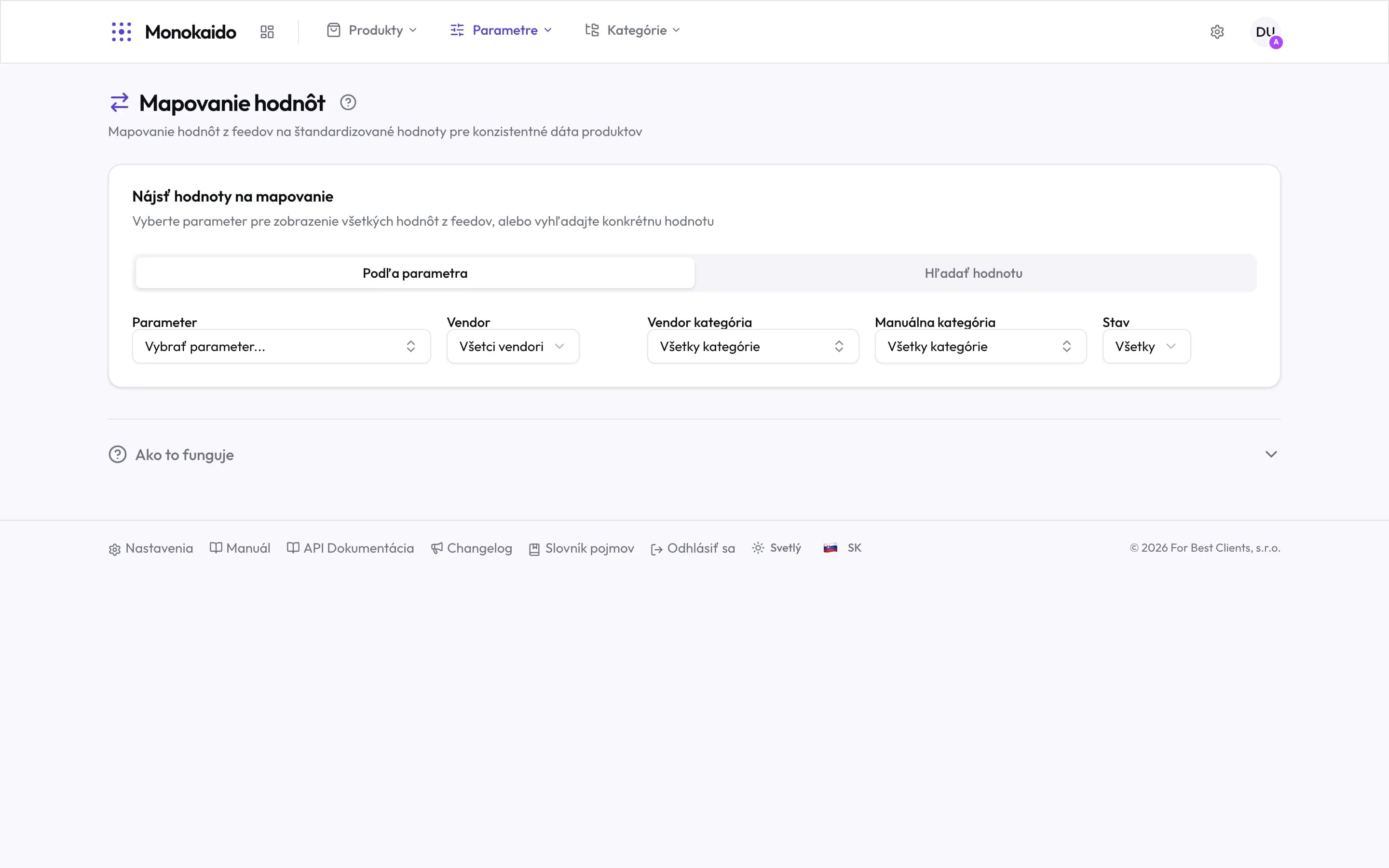
Controls on this screen
- By parameter — The systematic route: pick a parameter and walk all of its values at once.
- Find a value — The targeted route: search for one spelling across parameters. Right when chasing a single finding.
- Vendor — Narrows the values to one feed and lists that vendor's parameters first in the parameter list. Useful when you know which vendor spells things differently.
- Parameter — Until one is chosen the list is empty — that is not a fault. Find it by name, code or vendor; each parameter names the vendors whose products hold it.
- Vendor category — A further narrowing by the feed category.
- Manual category — Narrowing by your own tree — right when normalising one category at a time.
- State — Leaves only mapped or only unmapped values. The unmapped are the queue of work.
- How it works — A summary of the procedure, on the screen itself.
The page keeps its filter in the address. When you leave it — through a value's product count, for instance — and come back with Back, you see the same list: the same parameter, vendor, categories, state and page. A reload or a saved link restores it too.
The procedure
Pick a parameter
Start with one the shop filters by — colour, size, material. Parameters nobody filters by are low priority.
Let the AI propose
The AI walks the raw values and proposes which belong together. You confirm.
Finish the rest by hand
Abbreviations and typos the AI could not decipher. The State → unmapped filter is exactly the list of what is left.
Value transforms
Many values need no translation, only another spelling: 30 cm to 30cm,
30cm to 30, BLACK to Black. That is what transforms are for.
In the value-mapping dialog, Use source value opens the list of transforms, each with its result for the value:
| Group | Transforms |
|---|---|
| Letter case | Capitalize first letter, Title Case Every Word, UPPERCASE, lowercase |
| Spaces and units | Trim spaces, Remove all spaces, Attach unit to number (30 cm → 30cm), Space before unit (30cm → 30 cm) |
| Numbers | Whole number (30cm → 30, like intval), Number with decimals (30.50 cm → 30.5) |
| Text | Remove diacritics, Remove text in brackets |
A transform that cannot work on the value (a whole number out of a value with no number) is inactive and says why.
Custom transform… chains several steps with a live preview. Besides the steps of the list it offers:
- Replace text — replaces every occurrence of a text with another or removes it;
- Regular expression — replaces the matches (
$1,$2… for groups in the replacement) or extracts a match, for example(\d+)\s*cm→30; - Add prefix / suffix —
42→EU 42; - Split into several values —
black/white→blackandwhite; later steps run on each part.
Bulk transform
The Bulk transform button (or Transform for the selected values) runs one transform over every unmapped value of the parameter at once. The preview says what happens to each value:
- Will be mapped — a mapping source → result is saved;
- Unchanged — the transform leaves the value as it is, a mapping would do nothing, so none is saved;
- With an error — the transform cannot work on the value (it stays unmapped).
The result is saved as ordinary value mappings — for the selected vendor, or for every vendor when none is selected. The browser remembers the transform used last. The bulk transform needs no AI.
Rules of the feed parameter
While a feed name has no parameter mapping, a sync by default stores its values under the parameter of the same name, and you can write value mappings for that parameter. When you later map the name to another parameter, those rules keep applying: the mapping remembers the feed name's own parameter by itself, mappings made earlier included. In Parameter mappings the chip Values from: … · N rules shows it.
- A feed value is first unified by the rules of the feed parameter. When they hold a rule for it, its result stands and the target parameter's rules are not used.
- A value they hold no rule for is unified by the target parameter's rules. So
two feeds can write the same value differently: the target's rule
47→47cmserves frame sizes, while a shoe feed's parameter with the rule47→47keeps47. - At both steps a vendor's rule takes precedence over the global one.
- This holds for feed values only. Values from the AI or a person and copies from a product merge are unified by the target parameter's rules alone.
- When the feed name is spelled like the target parameter, it has no parameter of its own, and only the target's rules apply.
On this screen the feed parameter keeps its values after the name is mapped, so you write its rules here. The target parameter's list leaves out the values a feed parameter's rule already decides — a rule of the target would change nothing for them.
Scope of the rule
When you open Map value (or Edit value mapping, when a rule of the whole parameter already decides the value) in a product's Parameters table on a feed value that a parameter mapping brought into the parameter, the dialog offers the field Scope of the rule:
- Only for the feed parameter “…” — the rule is saved on the feed parameter and applies only to values that arrived under that name. This is the default for a new rule. If the feed name has no parameter of its own yet, one is created on save.
- For the whole parameter “…” — the rule applies to every value of the parameter that no rule of its feed parameter unified, whichever feed name it arrived under. When a rule of the whole parameter already decides the value, this option is the default and saving changes that rule; the feed-parameter option then creates a new rule that takes precedence for values from this feed.
When a rule of the feed parameter already decides the value, the dialog edits that rule and offers no choice — the Parameter field then names the feed parameter, not the one the value sits in. Nor is the choice offered for values from the AI or a person, merge copies, derived products of a split, or a feed name spelled like the target parameter.
Applies to vendor
One parameter receives values from several vendors, and the same spelling can mean something different at each: "MW" from EMOS is "yes", from another vendor "microwave". A rule therefore applies either to every vendor (global) or to one vendor only — pick it in the value-mapping dialog's Applies to vendor field. A vendor's rule takes precedence over the global one.
- A new rule starts with the vendor of the product, or of the filter, you opened the dialog from; you can pick another vendor or all of them.
- A vendor picked for a global rule: a new rule for that vendor only is created, and the global rule stays for the other vendors. That is how EMOS's "MW" → "yes" sits next to the global "MW" → "microwave".
- Another vendor for a vendor's rule: the rule moves — it stops applying to the vendor it had (the global rule, if there is one, applies to it instead).
- All vendors for a vendor's rule: the rule becomes global and applies to every vendor, including the one it had.
The dialog says what a save does, under the field, before you save.
If the value already has a rule for the same vendor (or a global rule, when you save a global one), the save is refused and the dialog stays open — edit that rule instead.
The value list on this screen follows the same rules: with a vendor selected, each value shows the rule that applies to that vendor — its own, else the global one — and a value only another vendor maps is unmapped for it. With All vendors a value is listed once per rule, and Mapped To names the rule's vendor or says Global.
Don't carry this value over
Some feed values do not belong in the shop at all — the "no" of a "suitable for a hallway" parameter, say, once its "yes" maps to "hallway". In the value-mapping dialog tick Don't carry this value over: no target values are asked for, and the value is neither written to the parameter nor sent anywhere (shop, feeds, ERP). The product and the value list show it as Not carried over.
- It applies to values from the feed only. A value entered by hand or by AI, a copy from a product merge and variant options are not affected.
- A value the rule no longer carries over can be entered on the product by hand (Add Manual Parameters on the edit page) — it is saved and carried over.
- The merge comparison does not show such a feed value, and a merge never copies it.
- For a parameter that applies to variants only the option is not offered — its values stay in the variant options.
- It takes effect like any value mapping, as soon as it is saved. The stored product values are removed at the vendor's next sync; when the parameter belongs to a parameter mapping (as its target or as its feed parameter), also right away in the background. Until they are removed, templates still count them as filled; after that, a required template parameter with no other value counts as missing.
- In the value list such a value counts as mapped, so AI value mapping and the bulk transform do not offer it. They do not overwrite a rule with Don't carry this value over — they skip that value (saving the others) and say why.
- The rule stays in the parameter's value list (without a category filter) even once no product holds the value, so it can be changed there. Untick it and enter a target value (the source value itself, to carry it over unchanged), and the value comes back — at the vendor's next sync at the latest. A vendor's rule can also be deleted in the vendor's parameter mappings (the Value Mappings tab).
- Grandus and WooCommerce shops get the parameter without it. If it was the product's only value of the parameter, though, a Grandus shop keeps a value it already received (its API deletes no parameter) — remove it there by hand. WooCommerce keeps it only when the product has no other parameter left.
The list of values is empty.
No parameter is selected. The screen opens empty on purpose — there are usually far too many values to load them all at once.
When does a mapping show up on products?
As soon as it is saved. From then on the shop, the exports and the transfer to an ERP send the mapped value. The vendor's next sync rewrites the stored product values. When the parameter belongs to a parameter mapping (as its target or as its feed parameter), a new mapping or a changed target value also makes the system recalculate them right away in the background. On a large catalogue that takes a while; there is nothing to run by hand.
How do I turn “30 cm” into “30”?
In the value-mapping dialog choose Use source value → Whole number. For every value of the parameter at once, run the Bulk transform with the Whole number step.
I mapped something wrongly. Can it be undone?
Yes, a mapping can be changed or deleted. The original feed values are untouched, so nothing was lost.