

Parameter templates
The prescription of which parameters a product in a category should carry — and how completeness is measured against it.
A template answers a question every colleague would otherwise answer differently: what does a bicycle need filled in before it can be sold? You write it down once, attach it to a category, and from then on the system knows which product is finished and which is not.
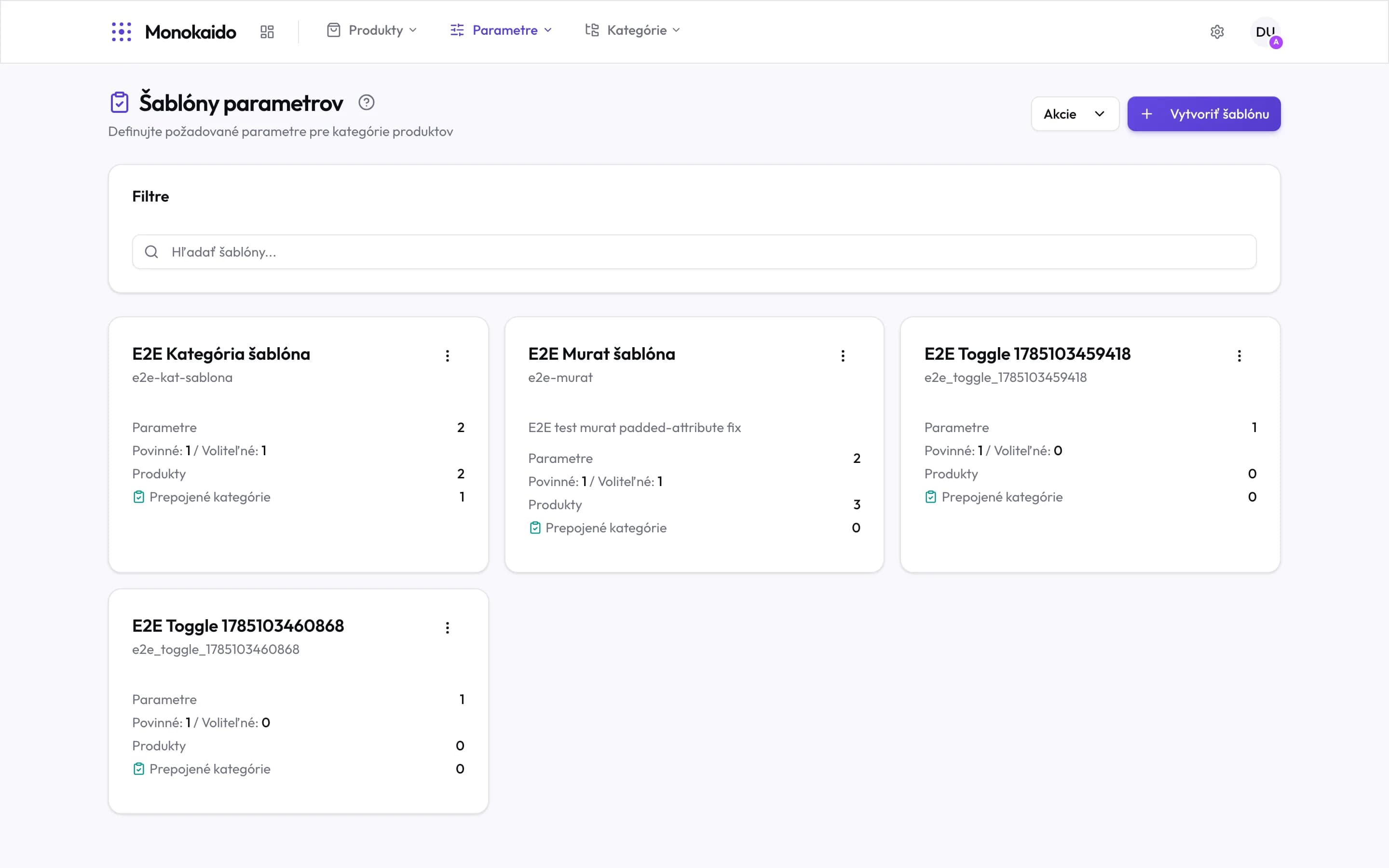
Controls on this screen
- Create template — A new template. The first step is choosing the parameters it holds.
- Actions — Bulk operations over templates — attaching one to several categories, for instance.
- Search — By template name and code.
- Template name — Name it after what it describes — "Bicycles", not "Template 3".
- Tile menu — Edit, duplicate and delete the template.
- Parameters — How many parameters the template prescribes.
- Required / Optional — Only required ones count towards a product's completeness. This is the most consequential decision in building a template.
- Products — How many products the template actually governs.
- Linked categories — How many categories carry it to products. Zero means it reaches products only by direct assignment.
How a template reaches a product
A template reaches a product by one of two routes. The usual one runs through a category:
The template is attached to a category
In the category's settings. Subcategories with no template of their own inherit it.
The product is in that category
Either through category mapping, or by manual placement.
A flow applies the template
The "Apply Category Template" action in a product flow is what actually enforces the prescription.
The other route is direct assignment. In the product list, select the products and choose Apply Template from the Actions menu. The template replaces every template those products had so far, and completeness is recalculated at once. On a single product's detail page you can also add one through Add manually…, and it joins the templates already there.
Careful: the flow step "Apply Category Template" in "Replace other templates" mode also removes directly assigned templates.
Required versus optional
| Choice | What it means | Consequence |
|---|---|---|
| Required | Without this parameter the product is not complete. | It counts towards completeness, and the product shows up among the unfinished. |
| Optional | Good to have, not necessary. | Does not count towards completeness. Still appears in the fill grid. |
Can a category have several templates?
A category has one. Subcategories may carry their own, which replaces the inherited one.
I changed a template — is completeness recalculated?
Yes, on the next flow run or import. To force it now, run the flow over that category.
Where do I see which products are missing what?
In Filling in values — pick the template and the grid shows the empty cells.