

Rules
Conditional "if this, then that" rules — when they are evaluated and in what order.
On this page
A rule is one sentence: if the condition holds, perform the action. Instead of filling in the "Drive type" parameter on e-bikes by hand after every import, you write it down once and the system does it.
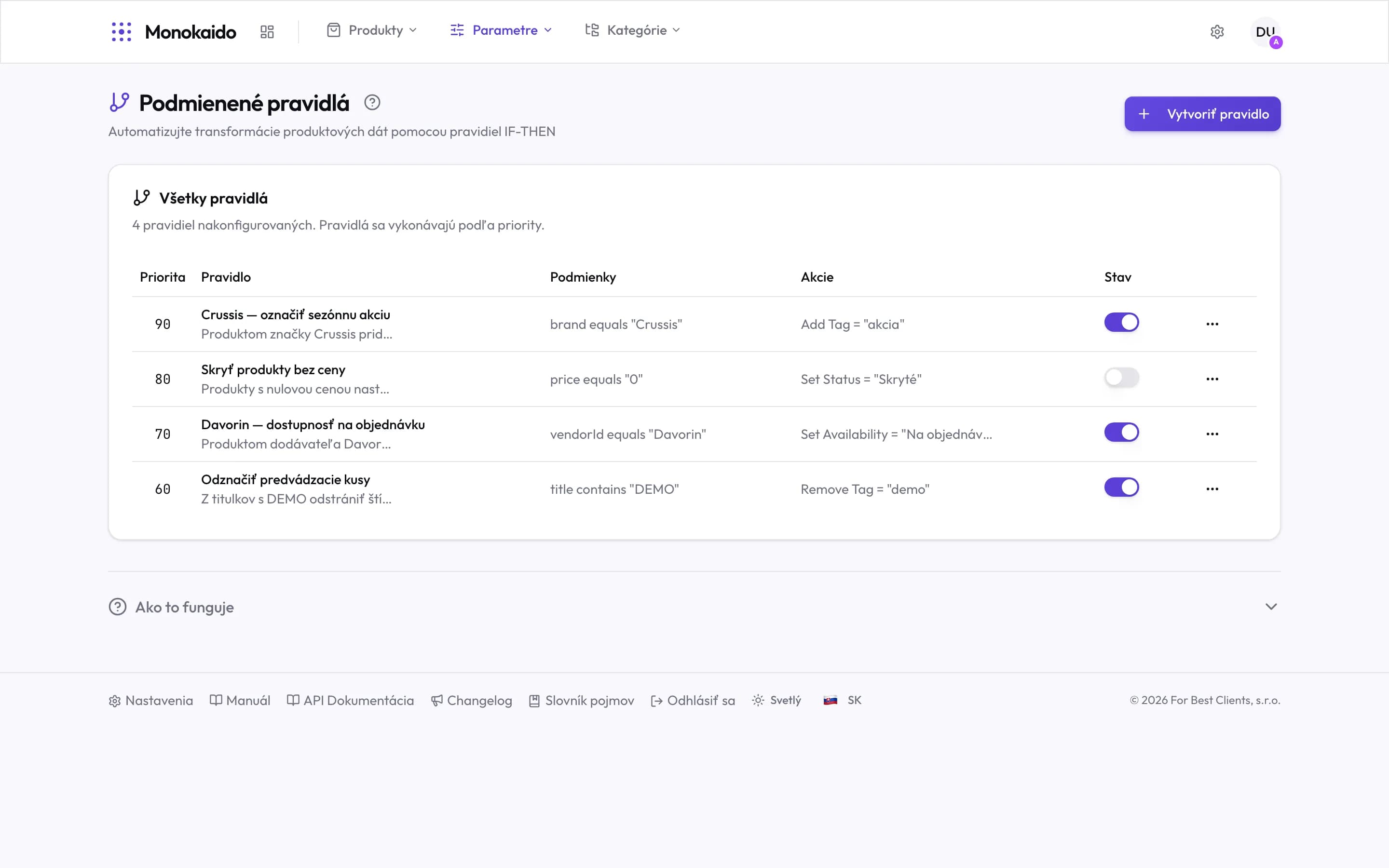
Controls on this screen
- Create rule — Opens the condition-and-action editor.
- The note about order — Rules run by priority, and the screen says so outright.
- Priority — A higher number runs first. A new rule gets the highest number.
- Name and description — Name a rule after what it does. A year from now this is the only clue.
- Condition — What must hold for the action to run. A brand condition like this one does not match anything yet. A condition on the title works reliably.
- Action — What happens when the condition holds. Only Set Parameter is saved so far. A tag, status or availability like the ones pictured leaves the product unchanged.
- Enabled toggle — A disabled rule stays written down but does not run. Safer than deleting.
- Row menu — Edit, duplicate and delete the rule.
What a rule is made of
| Part | Example | Note |
|---|---|---|
| Condition | title contains "e-bike" | Compares a product field with a value. Letter case does not matter. With several conditions joined by AND, all of them must hold. |
| Action | Set Parameter drive-type = "Electric" | What happens to the product when the condition holds. Only setting a parameter is saved. |
| Priority | 90, 80, 70… | A higher number runs first. A new rule gets the highest priority. You cannot change it in the editor. |
| State | Enabled / disabled | Disabling is how you take a rule out of service without losing what it says. |
When rules run
Enabled rules are applied during import: every product an import brings in or changes goes through normalisation, and with it through every enabled rule, in priority order. There is nothing to add them to and nothing to run by hand — a new rule takes effect on the next import.
I created a rule and nothing happened.
A rule takes effect on the next import. Check that it is enabled, that its condition really matches the products, and that the vendor has imported since. Also check that it relies on a Title condition and the Set Parameter action. With the editor's other options a rule usually changes nothing yet.
Can I undo what a rule changed?
Changes made by rules do not appear in Changes to review. Disable or edit the rule first and then correct the value — while the rule is enabled, the next import sets it again.
How many rules are too many?
There is no technical limit. Practically: when you can no longer say which rule sets which parameter, it is too many. Descriptive names help.